
In this guide:
- 13 UK industries with real Power BI examples - NHS trusts, councils, banks, retailers, universities and pharma
- Department use cases - what finance, sales, marketing, HR and operations dashboards actually look like
- How to get started - 2026 UK pricing, licensing tiers and the mistakes that derail rollouts
Looking for real-world Power BI dashboard examples? You're in the right place. This guide collects how UK businesses across 13 industries use Microsoft Power BI to turn raw data into actionable insights that drive better decisions.
Whether you're in healthcare, retail, finance or manufacturing, you'll find practical examples and UK-specific case studies that show exactly how Power BI dashboards can transform your organisation's approach to data.
What's in this guide
Power BI adoption in the UK: the numbers
Before we look at specific dashboard examples, let's set the scene with some UK-specific data. Microsoft Power BI has become the dominant business intelligence platform in the UK, and the numbers tell a compelling story.
IBISWorld puts the UK business intelligence and analytics software market at around £1 billion for 2025-26, with steady single-digit growth projected. Globally, Power BI commands 30.2% of the analytics and BI platform market - significantly ahead of Tableau and Qlik - and Microsoft has now sat in the Leaders quadrant of Gartner's Magic Quadrant for Analytics and BI Platforms for 18 consecutive years.
What's particularly striking is the adoption rates across UK sectors:
- Local government: 84% of UK councils use Power BI, per the Local Government Association's data-capability survey
- NHS healthcare: widely deployed across NHS acute trusts, with around 84% reported adoption
- Financial services: 83% adoption rate in 2025
- Retail: 44% of major UK retail chains
- SMEs: 39% of UK small and medium businesses
Perhaps most importantly, 52% of organisations see a return on their Power BI investment within 12 months. That's a quick payback for a tool that fundamentally changes how businesses understand and act on their data.
Now, let's look at how different industries are actually using Power BI in practice.
Power BI dashboard examples by industry
1. Healthcare (NHS and private sector)
Healthcare is one of the most data-intensive industries, and the NHS has been a major adopter of Power BI. With 84% of NHS acute trusts using the platform, healthcare analytics has been transformed.


NHS Power BI case studies:
North Tees and Hartlepool NHS Foundation Trust was an early NHS adopter of Power BI, led by Professor Philip Dean in the Department of Pharmacy. The trust migrated from Crystal Reports to cloud-based Power BI, achieving an 80% time reduction in building data models (from 5 days to just 1 day). Using Power Query, they now integrate external GP activity data with weather patterns to understand respiratory disease frequency, something impossible with their previous tools. Professor Dean described Power BI as "far more visual than the tools we've been using and has more impact."

NHS England deployed COVID-19 and flu surveillance dashboards providing weekly heatmaps of intensive care unit (ICU) occupancy, achieving a 22% reduction in emergency department overload through improved predictive capacity. The East of England regional team uses the Urgent Community Response dashboard to understand demand for 2-hour crisis response services, enabling evidence-based service design and workforce planning.

East London NHS Foundation Trust (ELFT) deployed Power BI across its mental-health services to bring operational and clinical data into one accessible place. Before the rollout, overnight patient paperwork audits on the ward took roughly four hours; afterwards, the same audits take about one hour - freeing nursing time for direct care. Mohammad Forid Alom, Strategic Lead for Information Analytics at ELFT, set out the design principles that drove adoption: "a single place to access all data, the ability to access it anywhere, and reflection of [staff's] Statistical Process Control methodology."
In 2024, the NHS Confederation partnered with Beamtree to launch "The Evolve Collaborative," an AI-powered analytics platform for NHS trusts. Matthew Taylor, CEO of the NHS Confederation, explained the rationale: "The NHS is awash with data but short on actionable insight, with too much focus on looking back and assuring and not enough looking forwards, learning and improving."
Key dashboard uses across NHS trusts:
- Urgent Community Response monitoring: Real-time tracking of 2-hour crisis response compliance, reducing manual reporting by 70%.
- Patient flow analytics: Predictive modelling to optimise bed occupancy, with adult bed occupancy dashboards tracking utilisation in real-time.
- Catchment population tracking: Real-time visualisation of patient distribution across 226 NHS trusts.
- Clinical performance dashboards: A&E waiting times, bed occupancy and readmission rates with drill-down to specific wards or time periods.
The NHS Community Health Services Data Plan (2024-2027) deployed Power BI dashboards across community health services in 2025, with Microsoft Fabric integration mandated by Q3 2026. The UK healthcare analytics market is projected to grow to around £10bn by 2033, and Power BI sits at the centre of this transformation.
2. Retail
UK retailers are under pressure to compete with online giants while managing complex omnichannel operations. 44% of major UK retail chains now use Power BI, and that number is growing as the sector embraces data-driven decision making.


UK retail case studies:
Tesco, the UK's largest grocer with 34% market share in online grocery, uses Power BI extensively for sales forecasting and performance tracking. The Clubcard programme has grown to 9 million active app users (up from 2 million in 2020), generating rich first-party data that feeds into Power BI dashboards. Tesco's forecasting dashboards analyse quarterly sales using moving averages, seasonal indices and trend analysis. The platform processes transaction data from nearly 2,000 UK supermarkets plus online orders, with dashboards tiered by role: store managers see hourly sales and inventory, regional managers see portfolio aggregations, category managers analyse product-level trends and executives track strategic KPIs.

John Lewis launched its retail media platform in 2024 powered by Epsilon technology. Power BI dashboards track campaign performance, customer engagement and sales attribution for brand advertising campaigns. All advertisements undergo in-house review before publication, with this quality control workflow managed through dashboard interfaces. The retail media data feeds back into broader merchandising analytics, revealing which product categories generate highest engagement.
Key retail dashboard uses:
- Sales performance tracking: Real-time dashboards showing sales by store, region, product category and time period with drill-down from national to individual store.
- Demand forecasting: Integration with Azure Machine Learning for inventory optimisation, with one major retailer reducing stockouts by 27%.
- Footfall analysis: 63% of UK retailers use Power BI geospatial analytics to visualise customer traffic patterns and optimise store layouts.
- Omnichannel analytics: Unifying online and offline sales data to measure true campaign ROI across channels.
Research suggests UK retailers will automate 60% of operational tasks using AI-driven analytics by 2035. Power BI dashboards are the foundation for this transformation, providing the visibility needed to identify automation opportunities.
3. Financial services
With 83% adoption in UK financial services, Power BI has become the standard for banking, insurance and investment analytics. The FCA's 2022 Data Strategy mandates "digital and intelligence-led regulation," making strong analytics a compliance requirement as much as a business advantage.


UK banking case studies:
HSBC has deployed Microsoft Power Platform across 50+ countries, serving over 20,000 users. The bank's client query management system processes over 8 million queries annually. Richard Lord, Managing Director and Regional CIO for Wholesale Asia Pacific, explained their citizen development approach: "We take the tooling for innovation out to the hands of the people who know the problems best." One Hong Kong-based analyst, trained on Power Platform, created an application saving the business 117,000 hours annually. HSBC's creative lending solution was deployed across 11 markets in just 90 days with 50% cost savings compared to traditional development.

Barclays deployed Microsoft 365 Copilot to 70% of employees in 2024, with users saving 30-60 minutes daily. Business risk reviews that previously took 3 weeks can now be completed in 1 day. Training programme creation dropped from 3 weeks to 1 day. The bank also uses AI-powered "Smart Assistants" that reduced client inquiry resolution time by 50% and escalation time by over 30%.
Metro Bank, the first new UK high street bank licensed in over 100 years, has built over 100 Power BI reports. The CEO famously described Power BI as "a bank in his pocket" because with a few clicks the company can visualise and investigate company data. Metro Bank uses Power BI across call centre operations (call volume, service levels, demographics), mobile and internet banking (transaction analysis), customer service (complaint tracking and resolution times) and staffing (peak activity identification).

Key financial services dashboard uses:
- Real-time liquidity monitoring: Dashboards tracking capital adequacy and liquidity positions for PRA (Prudential Regulation Authority) and FCA compliance.
- Customer analytics: Comprehensive views of customer behaviour, transaction patterns and cross-selling opportunities.
- Risk assessment: Visualising credit risk, market risk and operational threats across portfolios.
- Consumer Duty compliance: The FCA's Consumer Duty Act requires firms to demonstrate good customer outcomes. Power BI dashboards provide the evidence.
4. Manufacturing
Manufacturing SMEs show the strongest Power BI adoption among UK small businesses at 29%. The sector uses dashboards for everything from production monitoring to supply chain visibility.
Manufacturing dashboard examples:
- Production monitoring: Real-time OEE (Overall Equipment Effectiveness) dashboards showing machine uptime, performance and quality metrics.
- Quality control: Track defect rates, scrap percentages and quality KPIs with drill-down to specific production lines or shifts.
- Supply chain visibility: Monitor inventory levels, supplier performance and delivery times across multiple sites.
- Energy consumption: Track utility costs by production line, helping identify efficiency opportunities and meet sustainability targets.
UK manufacturers are using Power BI as part of Industry 4.0 initiatives, connecting IoT sensor data to create full operational dashboards. Plant managers report that having all this information in one place has reduced time to market and improved efficiency substantially.
5. Construction
The construction industry benefits enormously from Power BI's ability to consolidate data from multiple projects and systems. Dashboard use cases include:
- Project tracking: Visualise progress against milestones, budget spend and resource allocation across all active projects.
- Health and safety: Monitor incident rates, near-misses and compliance with safety requirements.
- Materials management: Track material usage, waste, reuse rates and CO2 emissions - increasingly important for sustainability reporting.
- Labour analytics: Monitor workforce allocation, productivity and contractor performance.
- Pre-financing risk: Identify cash flow risks and project financing issues before they become critical.
Construction firms use Power BI to gain an overview of company performance, spotting issues like unresolved service orders and work with longer lead times before they impact project delivery.
6. Education
UK universities are embracing Power BI for student success analytics and operational management. Several Russell Group institutions have deployed full analytics platforms.


UK university case studies:
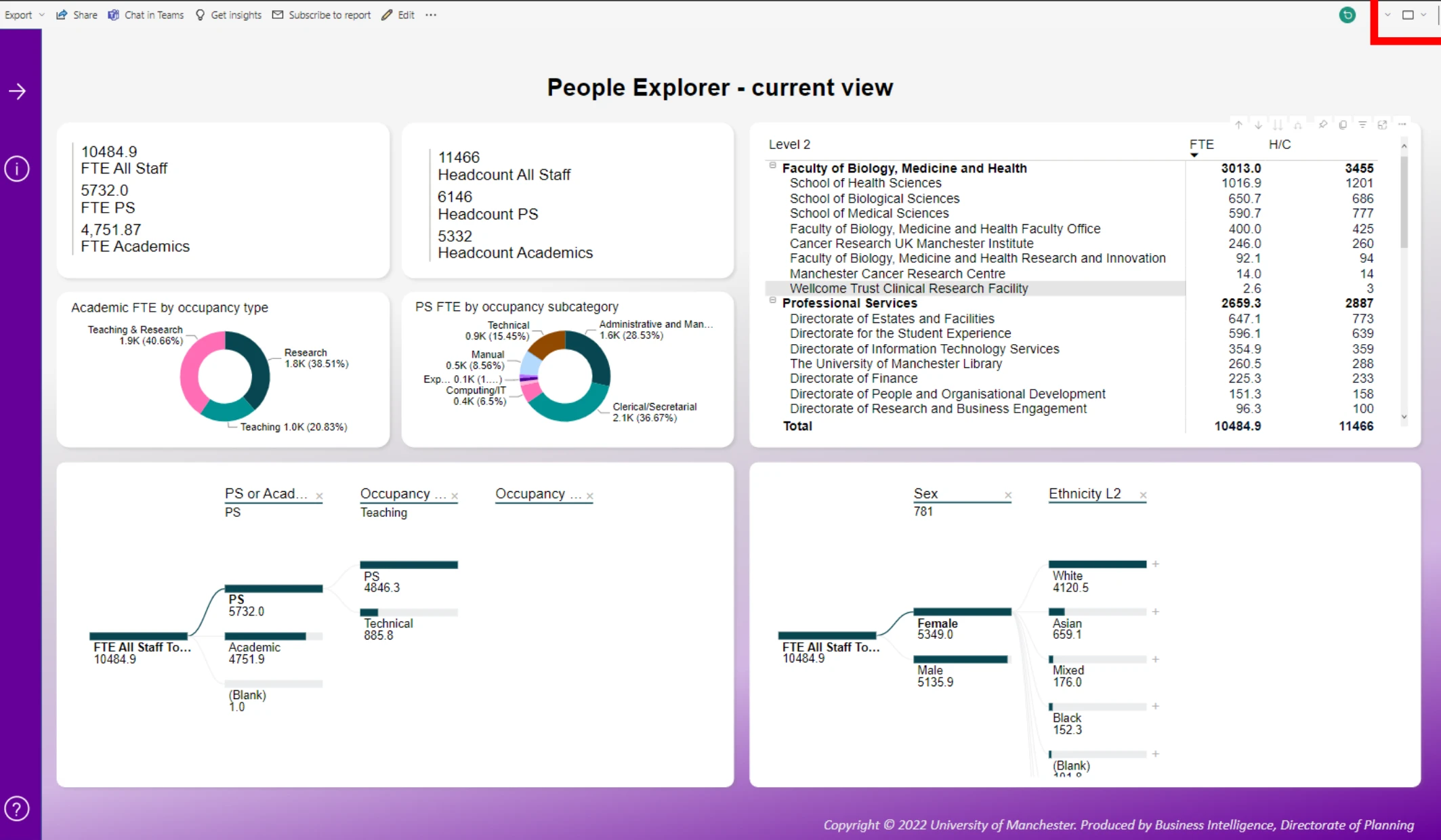
University of Manchester maintains 14 Power BI applications produced by the Directorate of Planning, based on verified Office for Students datasets. These include HESA (Higher Education Statistics Agency) benchmark dashboards comparing student numbers across the sector, Russell Group attainment and entry qualification comparisons showing how Manchester compares on average tariff scores and degree classifications, student destination metrics revealing progression to further study, access and participation tracking against targets and league table analysis covering six rankings (Complete University Guide, Guardian, Times, ARWU, QS, THE). The university also uses application funnel analysis to visualise recruitment across multiple admission cycles, including widening participation applicants.
University of Wolverhampton implemented a student attendance tracking dashboard in late 2024, created by the university's own MSc students as a practical project. The prototype was delivered within weeks and allows staff to break down attendance by course, department and student characteristics including home postcode and part-time employment status. Rather than manually sifting through spreadsheets, tutors can now quickly visualise which student groups are showing concerning patterns, enabling early intervention before students reach crisis points.

Key education dashboard uses:
- Student engagement tracking: Pooling data from VLE (virtual learning environment) access, library usage, assignment submissions and support services to create whole-student engagement scores with automated alerts.
- Admissions analytics: Track application volumes, conversion rates and demographic data across multiple cycles to improve recruitment strategies.
- League table monitoring: Track rank and score trends to inform strategic positioning and marketing.
- Research metrics: Track grant applications, publications and research impact.
7. Transportation and logistics
Heathrow Airport provides an excellent example of Power BI in transportation. As one of the UK's busiest airports, they use Power BI to stay ahead of disruptions that could affect passengers.

Stuart Birrell, Chief Information Officer at Heathrow, has said: "With Power BI, we can very quickly connect to a wide range of data sources with very little effort and use this data to run Heathrow more smoothly than ever before."

Transportation dashboard examples:
- Operations monitoring: Real-time tracking of flights, gates, baggage systems and passenger flow.
- Disruption management: Early warning dashboards that predict and respond to potential service disruptions.
- Fleet management: For logistics companies, tracking vehicle locations, delivery performance and driver efficiency.
- Route optimisation: Analysing delivery routes to reduce costs and improve service levels.
8. Insurance
Insurance companies use Power BI for claim analysis, underwriting insights and identifying new business opportunities. The platform serves as a unifying force, bringing together data from disparate communication channels and legacy systems.
Insurance dashboard examples:
- Claims analytics: Track claim volumes, processing times, settlement amounts and fraud indicators.
- Underwriting performance: Analyse loss ratios, pricing accuracy and risk selection by product and region.
- Customer insights: Understand customer behaviour, policy renewals and cross-selling opportunities.
- Regulatory compliance: Monitor solvency requirements and reporting obligations.
9. Local government
With 84% of UK councils using Power BI per the Local Government Association's data-capability survey, local government is one of the highest-adopting sectors. The same LGA survey (October-December 2024, 96 councils) found 53% of data professionals have access to Power BI and other data tools, with 49% of councils assessing themselves at data maturity level 3 ("making good progress in developing capacity and capabilities").


UK council case studies:
- Dorset Council: Housing service transformation reduced case resolution time by 45% through geospatial analytics of council properties.
- Hammersmith & Fulham: AI-powered CCTV analytics in Power BI cut fly-tipping incidents by 31%.
- Buckinghamshire Council: Productivity increased 30% after Copilot integration for social care reporting.
- Lincolnshire County Council: migrated reporting from legacy BusinessObjects to Power BI, with the lead user reporting a 30% weekly time saving (around 10 hours every week) once the new platform was embedded. The full migration ran over three years, with staff trained as the rollout progressed.


The Office for National Statistics runs ONS Local, providing analytical support to councils including Power BI training. Between April 2022 and March 2025, 89% of surveyed local authorities used this support, describing impacts as "invaluable" for improving analytical capability and enabling evidence-based decision-making. The LGA survey found that 61% of councils have produced business cases for data investment in the past 5 years, with almost half having deployed data warehouses and Power BI dashboards to improve accessibility.
Councils use Power BI for everything from social care planning and benefits processing to environmental monitoring and public health tracking. The ability to make data accessible to councillors and citizens supports transparency and better decision-making across the sector.
10. Energy and utilities
Energy companies face unique challenges around grid management, sustainability reporting and customer engagement. Power BI dashboards help manage these complex operations.
Energy sector dashboard examples:
- Grid monitoring: Real-time visualisation of energy generation, distribution and consumption.
- Sustainability metrics: Track carbon emissions, renewable energy percentages and progress towards net-zero targets.
- Customer analytics: Understand usage patterns, billing queries and service issues.
- Asset management: Monitor infrastructure condition and plan maintenance activities.
11. Professional services
According to Apps Run the World, professional services is the largest user of Microsoft Power BI globally. Consultancies, accountancies and legal firms use dashboards to manage client work and business development.
Professional services dashboard examples:
- Project profitability: Track time spent versus budget across client engagements.
- Resource utilisation: Monitor billable hours, staff allocation and capacity planning.
- Business development: Pipeline tracking, win rates and client relationship management.
- Client reporting: Automated reporting for clients on project progress and outcomes.
12. Hospitality and tourism
Hotels, restaurants and tourism businesses use Power BI to manage occupancy, optimise pricing and improve guest experiences.
Hospitality dashboard examples:
- Revenue management: Track occupancy rates, room prices and RevPAR (revenue per available room) in real-time.
- Guest analytics: Understand booking patterns, guest preferences and satisfaction scores.
- Operations: Monitor staff scheduling, food costs and service levels.
- Seasonal planning: Analyse historical data to forecast demand and plan for peak seasons.
13. Pharmaceutical and life sciences
Pharmaceutical and life-sciences companies use Power BI to consolidate commercial, clinical and operational data that previously lived in separate Excel files, accounting systems and CRM exports. The result is a faster monthly reporting cycle and a single source of truth that finance, commercial and clinical leadership all see at once.
UK pharma case study:
Otsuka Pharmaceutical UK previously spent up to four days per month manually downloading and consolidating data from multiple systems to build Excel reports. Power BI replaced that process. Paul Newman, Commercial Director at Otsuka UK, described the change: "Using Power BI has made us more efficient overnight. Four days per month can now be spent on concentrating on business growth rather than manually creating reports. The best aspect for me is being able to access information instantly and knowing it's pulled directly from various systems, so the integrity of the data is never in question."
Key pharma dashboard uses:
- Commercial performance: Real-time view of sales, market share and territory performance across product portfolios, replacing month-end Excel consolidation.
- Clinical and R&D analytics: Tracking trial enrolment, site performance and operational metrics across multiple programmes.
- Regulatory and pharmacovigilance reporting: Consolidated dashboards supporting MHRA and EMA reporting obligations.
- Supply chain and manufacturing: Production, batch and quality dashboards that tie back to demand forecasting.
Need help building dashboards like these?
Our UK-based Power BI consultants have delivered business intelligence solutions across healthcare, retail, finance and more. Whether you need a single dashboard or a complete analytics platform, we can help.
Power BI use cases by department
Beyond industry-specific applications, Power BI dashboards serve common functions across departments. Here's how different teams typically use the platform:
Finance and accounting
Finance teams use Power BI to automate reporting that previously required hours of Excel work. Organisations implementing financial dashboards report 40-50% reduction in manual data consolidation and reconciliation activities. Metro Bank built over 100 automated reports, eliminating manual errors and freeing finance staff for higher-value analysis. Reckitt achieved 60% improvements in insight generation for financial and marketing analysis by integrating Power BI with Microsoft Copilot. Common dashboards include P&L statements, cash flow monitoring, budget vs actual comparisons and profitability analysis with indirect cost allocation by customer or product.
Sales
Sales dashboards track pipeline health, team performance and customer analytics. By connecting to CRM systems like Salesforce or HubSpot, teams get real-time visibility into opportunities, win rates and revenue forecasts. One consultancy reported saving 30 working hours per week by automating their sales reporting.
Marketing
Marketing teams use Power BI to measure campaign ROI across channels. By pulling data from Google Ads, Facebook Ads, LinkedIn and other platforms into a single dashboard, marketers can compare performance and optimise spend. Heineken used this integrated approach to achieve a 20% increase in sales while simultaneously reducing marketing expenses by 10%. Advanced dashboards track customer acquisition cost (CAC) and lifetime value (CLV) to identify which channels deliver the highest-value customers.
Human resources
HR dashboards track workforce composition, recruitment pipelines, absence rates and employee performance. One diamond polishing company used Power BI HR dashboards to reduce overtime hours from 15,000 per month to just 1,000 by identifying the root causes - primarily employee attrition leaving roles unfilled.
Operations
Operations teams use Power BI to track productivity, project progress and resource allocation. Dashboards connected to project management tools like ClickUp or Jira provide visibility into how time is spent across projects and team members, helping identify bottlenecks and optimise workflows.
Want to build dashboards yourself?
Our 2-day Power BI training course teaches you how to create professional dashboards from scratch - live, hands-on, taught by a trainer who has led Power BI training for a FTSE 100 company. Corporate training is available, tailored to your industry. New to choosing a course? Our Power BI training buyer's guide compares formats, costs and providers, and our guide to the PL-300 certification explains the exam itself.
View our Power BI training courseGetting started with Power BI
If these examples have sparked your interest, here's what you need to know about implementing Power BI in your organisation. The business case is compelling: a Forrester study found organisations achieve 366% ROI over three years with payback in under six months. The key benefits include time savings of 1.75 hours per week per business user and a 42% reduction in centralised analytics team effort. And if you are wondering how hard Power BI is to learn, the platform's spreadsheet-like familiarity means most business users become productive faster than they expect.
Licensing options for UK businesses
Power BI offers several licensing tiers:

- Power BI Free: Basic features for individual use, with limited sharing capabilities.
- Power BI Pro: £10.80 per user per month (billed annually). This is what most organisations start with, providing full collaboration and sharing features.
- Power BI Premium Per User: £18.50 per user per month. Includes AI features and larger data capacity.
- Power BI Premium: Capacity-based licensing for enterprises with heavy usage.
For UK SMEs, the Pro licence typically provides everything needed to get started. The platform integrates with Microsoft 365, so if your organisation already uses Office tools, adoption is even smoother.
Common mistakes to avoid
Research examining over 100 Power BI implementations has identified the critical success factors that separate successful projects from failed ones. If you're weighing up making the move from spreadsheets first, our guide to Power BI versus Excel walks through when that switch makes sense.
- Starting without clear objectives: Define what questions you need to answer before building dashboards. Establish a consistent reporting rhythm with weekly or monthly review meetings that examine dashboard data.
- Waiting for perfect data: Address data quality pragmatically. Don't delay implementation until all data issues are resolved. Power BI dashboards often help identify data quality problems by making inconsistencies visible.
- Waterfall development approach: Use agile or scrum methodology with 2-3 week iterations. This enables rapid course correction when initial designs don't meet user expectations.
- Building dashboards in isolation: Involve key stakeholders directly from inception. When stakeholders participate in dashboard development, they become advocates for adoption.
- Neglecting documentation: Document how the solution is organised, how KPIs are calculated and why design decisions were made. This ensures knowledge persists when original developers leave.
- Not establishing governance: Define who can publish reports, data refresh schedules and access controls from the start. Assign a dedicated product owner to translate between business needs and technical capabilities.
Is Power BI right for your business?
Power BI is particularly well-suited if (and for the difference between Power BI reports and dashboards, our Eaglepedia entry covers the distinction):
- You already use Microsoft 365 tools (Excel, SharePoint, Teams)
- You need to consolidate data from multiple sources
- Manual reporting is consuming significant staff time
- You want self-service analytics for business users
- Budget is a consideration (Power BI is more cost-effective than alternatives)
Consider alternatives if you have extremely complex visualisation requirements (Tableau may be stronger - we've compared them side by side) or need embedded analytics for manufacturing systems (Qlik has strengths here).
Sources
- Local Government Association, Local government data capacity and capability survey, October-December 2024 - local.gov.uk/sites/default/files/documents/Local%20government%20data%20capacity%20and%20capability%20survey%20-%20final%20report_0.pdf
- IBISWorld, UK Business Intelligence and Analytics Software Publishing report, 2025-26 - ibisworld.com/united-kingdom/industry/business-intelligence-analytics-software-publishing/14591/
- Microsoft, Power BI pricing (UK), May 2026 - microsoft.com/en-gb/power-platform/products/power-bi/pricing
- Microsoft, East London NHS Foundation Trust customer story - microsoft.com/en/customers/story/1554899790298123595-east-london-nhs-foundation-trust-health-azure-en-united-kingdom
- Microsoft, Heathrow Airport customer story - microsoft.com/en/customers/story/709586-heathrow-airport-travel-transportation-powerbi-azure
- Microsoft, Metro Bank customer greet application - microsoft.com/en-us/power-platform/blog/power-apps/metro-bank-customer-greet-app/
- Futuresavvy, Lincolnshire County Council Power BI and DAX training case study - futuresavvy.co.uk/case-studies/power-bi-and-dax-training-case-study-saving-10-hours-a-week
- Bespoke, Otsuka Pharmaceutical UK case study - bespoke.xyz/casestudies/otsuka/
- electroIQ, Power BI statistics, 2025 - electroiq.com/stats/power-bi-statistics/
- Microsoft Fabric Community, Power BI February 2026 feature summary - community.fabric.microsoft.com/t5/Power-BI-Updates-Blog/Power-BI-February-2026-Feature-Summary/ba-p/5173936
- NHS Confederation and Beamtree, The Evolve Collaborative announcement, 2024
- Forrester Consulting, Total Economic Impact of Microsoft Power BI, 2020
- Gartner, Magic Quadrant for Analytics and Business Intelligence Platforms, 2025
Frequently asked questions
Ready to get started?
These Power BI dashboard examples show just a fraction of what's possible. Whether you're in healthcare tracking patient outcomes, retail optimising inventory or finance ensuring regulatory compliance, the case studies on this page are real UK organisations that have already made the move.
The key is starting with clear objectives and building dashboards that answer specific business questions. If you want to skill up your own team, our Power BI training buyer's guide walks through formats, costs and providers. If you'd rather hand the build to specialists, our UK Power BI consultants are here to help.

About the author
Ihor Havrysh
Software Engineer
Software Engineer at Red Eagle Tech with expertise in cybersecurity, Power BI, and modern software architecture. I specialise in building secure, scalable solutions and helping businesses navigate complex technical challenges with practical, actionable insights.
Read more about Ihor





