Quick answer: System integration connects your different business software so they share data automatically. UK businesses typically spend £5,000 to £100,000+ on integration projects, with most SME projects falling in the £15,000-£50,000 range. A well-planned integration saves 10-15 hours per employee weekly on manual data entry and eliminates the costly errors that come from copying information between systems.
If your team spends hours copying data between your CRM, accounting software, and spreadsheets, you're not alone. Most UK businesses run six or more different software tools daily, and the vast majority of those tools don't talk to each other.
The result? Wasted time. Duplicate data entry. Human errors that cascade into billing mistakes and missed customer communications. Staff frustration. And critical business decisions made on incomplete or outdated information because nobody can get a unified view of what's actually happening.
System integration solves these problems by connecting your software so data flows automatically between them. When a sales rep closes a deal in your CRM, the order details appear in your accounting system. When stock levels change, your e-commerce platform updates instantly. When a customer calls, your support team sees their complete history across every system.
This guide covers everything UK business owners and managers need to know about system integration: what it involves, how the different approaches compare, what it costs, and how to plan a successful integration project.
What is system integration?
System integration is the process of connecting different computer systems and software applications so they work together and share information automatically. Instead of your team manually transferring data between your CRM, accounting package, and inventory system, integrated systems communicate directly.
Think of it this way: your business probably uses Xero or Sage for accounting, Salesforce or HubSpot for customer management, maybe Shopify for e-commerce, plus various other tools for email, project management, and communications. Each of these is like an island with its own data. System integration builds bridges between these islands.
When a customer places an order on your website, proper integration means that order automatically creates an invoice in your accounting software, updates your inventory levels, triggers a fulfilment workflow, and adds the transaction to the customer's CRM record. No copying. No pasting. No "I'll update the spreadsheet later."
A practical example
Take a typical scenario: a sales rep closes a deal worth £15,000 in your CRM. Without integration, they need to:
- Create the customer record in your accounting system (if it doesn't exist)
- Generate an invoice with all the correct details
- Update the project management system so delivery can begin
- Perhaps notify the warehouse or update inventory
- Log everything in your reporting spreadsheet
That's 15-30 minutes of administrative work, with plenty of opportunities for typing errors. Multiply that by dozens of transactions daily, and you're looking at serious time drain and error risk.
With integration, the sales rep marks the deal as won in the CRM, and everything else happens automatically within seconds. The data flows between systems accurately every time.
The core principle: Data should be entered once and flow automatically to every system that needs it. Your people should focus on customers and strategy, not copying numbers between applications.
Why system integration matters for UK businesses
The average UK SME now uses six or more different software tools daily. That number has grown steadily as businesses adopt specialised tools for different functions. Your marketing team might love Mailchimp. Sales swears by Salesforce. Accounts can't live without Xero. Operations has its own systems. And the CEO wants dashboards that show everything in one place.
This "best of breed" approach makes sense. Specialised tools are usually better at their job than all-in-one platforms trying to do everything. But without integration, each tool becomes a data silo.
The hidden cost of disconnected systems
Research suggests UK businesses waste significant resources on manual workarounds caused by disconnected systems:
| Problem | Typical impact |
|---|---|
| Manual data entry between systems | 2-3 hours per employee daily |
| Errors from re-keying information | 3-5% error rate on manual entries |
| Delayed decisions due to incomplete data | Days or weeks of delayed insight |
| Duplicate subscriptions for overlapping tools | 15-25% of software spend |
| Customer service issues from inconsistent records | Reduced satisfaction and repeat business |
For a ten-person business, if each employee loses just two hours daily to system navigation and data re-entry, that's 20 hours of productivity per day. At an average fully-loaded cost of £20 per hour, that's £400 daily, or roughly £100,000 annually in lost productivity.
An integration project costing £30,000 that eliminates even half of that waste pays for itself within months.
The UK market reality
The UK integration market is growing at around 12% annually, with SMEs driving much of that growth. Several factors are accelerating this:
- Cloud adoption: Most modern software is cloud-based with APIs, making integration more accessible than ever
- Rising labour costs: Manual workarounds become more expensive each year
- Customer expectations: Customers expect joined-up service across channels
- Competition: Integrated competitors move faster and make better decisions
- AI readiness: Integration is a prerequisite for most AI initiatives, which need unified data
Integration as digital transformation foundation
According to Deloitte's research, 85% of enterprises consider API-driven ecosystems as foundational to their digital transformation strategy. Yet only 42% have achieved full integration across their business functions. This gap represents both a challenge and an opportunity for UK businesses willing to invest in connecting their systems.
Organisations with integrated systems report nearly three times better flexibility in responding to market changes compared to those relying on manual processes. This agility becomes particularly valuable during periods of rapid change, where the ability to adapt quickly can determine competitive success.

Types of system integration
There are several approaches to connecting business systems, each with different trade-offs around cost, complexity, and flexibility. Understanding these options helps you choose the right approach for your situation.
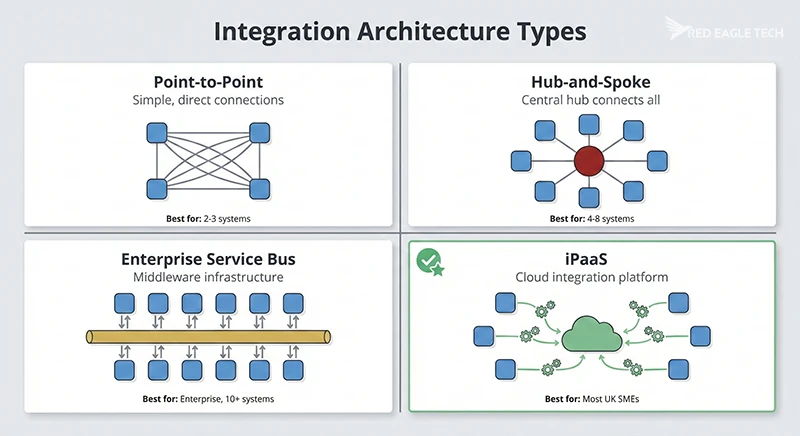
Point-to-point integration
Direct connections between two specific systems.
Best for: Simple needs with 2-3 systems
Typical cost: £5,000-£15,000 per connection
Pros: Simple, quick to implement, low initial cost
Cons: Becomes unmanageable as you add more systems; each new system needs multiple connections
Hub-and-spoke (star integration)
All systems connect to a central hub rather than to each other.
Best for: Growing businesses with 4-8 systems
Typical cost: £15,000-£50,000
Pros: Easier to manage than point-to-point; adding new systems is simpler
Cons: Hub becomes a single point of failure; still requires individual connectors
Enterprise Service Bus (ESB)
Dedicated middleware infrastructure handling all communication between systems.
Best for: Large enterprises with complex, stable requirements
Typical cost: £50,000-£300,000+
Pros: High performance; complete customisation; full control
Cons: Expensive; requires specialised staff; slow to modify; 8-16 week implementation
iPaaS (Integration Platform as a Service)
Cloud-based platform with pre-built connectors and visual workflow design.
Best for: Most UK SMEs; modern cloud-first businesses
Typical cost: £200-£2,000/month plus implementation
Pros: Fast deployment (2-8 weeks); pre-built connectors; no infrastructure; lower technical barrier
Cons: Less customisable than ESB; ongoing subscription costs; dependent on vendor
Which approach is right for you?
For most UK SMEs, iPaaS is the sweet spot. It offers the speed and simplicity that growing businesses need without the infrastructure overhead of traditional approaches. Popular iPaaS platforms include Zapier, Make (formerly Integromat), Workato, and Microsoft Power Automate.
Point-to-point works when you genuinely only need to connect two systems. But businesses often underestimate how quickly their integration needs grow. What starts as "just connect the CRM to accounting" soon becomes CRM to accounting, plus e-commerce, plus email marketing, plus inventory, plus reporting.
ESB solutions make sense for large organisations with hundreds of systems, complex data transformation needs, and dedicated integration teams. For most SMEs, ESB is overkill.
Popular iPaaS platforms and UK pricing
| Platform | Best for | UK pricing | Key strengths |
|---|---|---|---|
| Zapier | Simple automations, non-technical users | From £20/month | 7,000+ app connectors; intuitive interface; quick setup |
| Make | Visual workflows, moderate complexity | From £9/month | Visual scenario builder; good value; conditional logic |
| Workato | Enterprise automation, complex needs | From £5,000/year | 1,000+ connectors; enterprise security; low-code development |
| Celigo | NetSuite users, high-volume operations | Custom pricing | Native NetSuite integration; AI error handling; predictable costs |
| Power Automate | Microsoft 365 users | Included with M365 (basic); £15/user/month (premium) | Deep Microsoft integration; familiar interface for Office users |
A word of caution on pricing: task-based platforms like Zapier can become expensive at high volumes. If you're processing thousands of orders monthly, platforms with endpoint-based or flat-rate pricing may prove more economical long-term.
Common integration scenarios
While every business has unique needs, certain integration patterns appear repeatedly across UK companies. Here are the most common scenarios we see:
CRM integration
Connecting your Customer Relationship Management system to other tools is often the highest-value starting point. Common CRM integrations include:
- CRM to accounting: Closed deals automatically create invoices; customer payment status syncs back to CRM
- CRM to marketing automation: New leads flow into email campaigns; engagement data enriches contact records
- CRM to support desk: Support tickets link to customer records; sales sees open issues before calling
- CRM to e-commerce: Online purchase history appears in customer records; abandoned cart triggers follow-up
A well-integrated CRM becomes the central hub of your customer knowledge. For more on CRM systems, see our guide to bespoke CRM development.
Popular CRM platforms and their integration capabilities:
- HubSpot (free tier available, paid from £20/month): Strong native integrations with Xero, QuickBooks, and Sage for UK accounting needs. All data stored in one database, making cross-functional reporting straightforward.
- Salesforce Essentials (from £20/user/month): Enterprise-grade integration capabilities at SME pricing. Works well with most business applications through AppExchange marketplace.
- Zoho CRM (from £12/user/month): Cost-effective with built-in marketing automation and email integration. Good for businesses wanting to minimise external integrations.
ERP and accounting integration
Enterprise Resource Planning (ERP) and accounting integrations reduce financial admin and improve accuracy:
- Sales orders to invoicing: Orders from any channel automatically generate correct invoices
- Inventory to accounting: Stock movements flow to cost of goods sold calculations
- Payroll to general ledger: Salary costs post automatically with correct coding
- Bank feeds to reconciliation: Transactions match automatically to open items
UK ERP options and integration considerations:
- Microsoft Dynamics 365 Business Central (from £62/user/month): Integrates natively with Microsoft 365 apps. Different modules use separate databases connected through Dataverse middleware, so cross-functional reporting requires careful integration planning.
- NetSuite (custom pricing, typically £500+/month): All modules share a single database, eliminating many internal integration challenges. Strong for businesses wanting a unified platform.
- SAP Business One (typically £100-200/user/month): Good for manufacturing and distribution. Often requires third-party add-ons and integrations for complete functionality.
E-commerce integration
For businesses selling online, integration is often the difference between growth and chaos:
- Multi-channel inventory: Stock levels sync across your website, Amazon, eBay, and physical locations
- Order to fulfilment: Orders automatically route to the correct warehouse or supplier
- Pricing synchronisation: Price changes apply consistently across all channels
- Customer data unification: Purchase history consolidates regardless of where customers buy
We've written more about this in our guide to ecommerce microservices architecture, and our article on common e-commerce integration mistakes covers the pitfalls to avoid.
HR and payroll integration
Connecting people systems saves significant HR admin time:
- HRIS to payroll: New starters, leavers, and changes flow automatically
- Time tracking to payroll: Hours worked calculate pay without re-entry
- HR to IT systems: New employees get accounts provisioned; leavers get access revoked
- Benefits to deductions: Pension contributions and other deductions apply correctly
What is API integration?
When people talk about modern system integration, they usually mean API integration. An API (Application Programming Interface) is a standardised way for software applications to communicate with each other.
Think of an API as a waiter in a restaurant. You (one system) want to order food from the kitchen (another system), but you can't just walk into the kitchen and start cooking. The waiter takes your order, communicates it to the kitchen in a format the chefs understand, and brings back what you asked for. The API does the same thing between software systems.
How APIs work in practice
When your e-commerce platform needs to check if an item is in stock, it sends an API request to your inventory system. The request says, essentially, "What's the current stock level for product SKU-12345?" The inventory system processes the request and sends back a response: "SKU-12345 has 47 units available."
This happens in milliseconds, automatically, thousands of times per day. No human involvement required.
Most modern cloud software (Salesforce, Xero, HubSpot, Shopify, and hundreds of others) provides APIs specifically designed for integration. This is a major shift from the past, when connecting systems often required expensive custom development or clunky file-based transfers.
API types you might encounter
Different API types suit different situations. Here's what you need to know about each approach:
| API type | How it works | Best for | Limitations |
|---|---|---|---|
| REST API | Uses standard web protocols (HTTP). Each piece of data has its own URL. Simple request-response pattern. | Most cloud applications, e-commerce, CRM systems. The most widely supported format. | May require multiple requests to get related data. Can transfer more data than you actually need. |
| SOAP API | Formal XML-based messaging with built-in security standards. More structured than REST. | Financial services, healthcare, government systems where compliance and transaction integrity matter. | Complex to implement. Larger message sizes mean slower performance. Declining in popularity. |
| GraphQL | Single endpoint where you specify exactly what data you want. The system returns only what you asked for. | Complex applications needing precise data. Real-time features. Developer-focused platforms. | Steeper learning curve. Caching is more complex. Requires specialised tooling. |
| Webhooks | Event-driven: the source system pushes data to you when something happens, rather than you asking for it. | Real-time notifications. Payment confirmations. Stock updates. Any "when X happens, do Y" scenario. | You need to handle delivery failures gracefully. Requires proper security validation. |
REST: the practical choice for most integrations
REST APIs dominate modern integration because they work with standard web infrastructure. If your e-commerce platform, CRM, and accounting software all have APIs, they're almost certainly REST APIs. They're well-documented, widely understood by developers, and work reliably at scale.
Webhooks: for real-time responsiveness
Webhooks solve a fundamental problem with traditional APIs. Instead of constantly asking "has anything changed?" (which wastes resources), webhooks tell you immediately when something happens. Payment processors like Stripe use webhooks to notify your systems the instant a payment succeeds. E-commerce platforms like Shopify trigger webhooks when orders are placed.
For UK businesses needing real-time inventory updates, payment confirmations, or instant notifications, webhooks are often essential.
Don't worry if these technical distinctions feel complex. A good integration partner will recommend the right approach for your situation. What matters for business decisions is understanding that APIs make integration possible and that most modern software supports them.
Legacy system warning: Older software, especially systems built before 2010, may not have APIs. Integrating these legacy systems is still possible but typically costs 2-3x more due to the custom development required. If you're evaluating new software, always check that it has API capabilities.
Benefits of system integration
The business case for integration is backed by substantial research. According to Forrester's Total Economic Impact studies, enterprise organisations implementing integration platforms achieve an average return on investment of 299% over three years. Manufacturing businesses see even higher returns, with some studies documenting 354% ROI from connecting production systems with supply chain and customer data.

These aren't abstract figures. They translate into measurable improvements across your operations:
Time savings
Employees typically save 2-3 hours daily that was previously spent on manual data entry and system navigation. For a 10-person team, that's 20-30 hours reclaimed every day.
Improved accuracy
Data entered once flows correctly to all systems. No more discrepancies between your CRM and accounting records, or stock levels that don't match reality.
Real-time visibility
Dashboards and reports draw from live, unified data. No more "let me check another system" or waiting for someone to compile a spreadsheet.
Faster decision making
When everyone works from the same accurate, current information, decisions happen faster. Opportunities get captured before they disappear.
Better customer experience
Customer-facing staff see complete history across all touchpoints. No asking customers to repeat information or embarrassing mix-ups from outdated records.
Cost reduction
Beyond productivity gains, integrated businesses often consolidate redundant tools and reduce IT support costs. Typical savings: 10-20% of IT spend within 2-3 years.
Calculating your potential return
A simple way to estimate integration ROI:
- Identify time wasted: How many hours weekly do your staff spend on manual data transfer between systems?
- Calculate cost: Multiply hours by fully-loaded hourly cost (salary + benefits + overhead, typically £20-40/hour for UK office workers)
- Estimate recovery: Integration typically eliminates 60-80% of this waste
- Compare to investment: Most SME integration projects pay back in 6-18 months
If you have 10 employees each wasting 2 hours daily on manual workarounds, that's 100 hours per week, or roughly £100,000 annually at £20/hour. An integration project costing £35,000 that recovers 70% of that time (£70,000 annually) delivers a payback period of about 6 months.
Industry benchmark: CRM integration projects typically achieve payback within 13 months, faster than most enterprise software investments. Organisations with integrated CRM systems are 86% more likely to exceed their sales goals compared to those with fragmented customer data.
Revenue benefits beyond cost savings
While cost savings are easier to measure, integration often delivers larger value through revenue improvements:
- Better sales targeting: Unified customer data enables marketing to deliver up to 60% more qualified leads to sales teams
- Higher transaction values: Integrated product recommendations can generate up to 26% higher order values by identifying relevant cross-sell opportunities
- Improved forecast accuracy: Organisations report 25-32% improvements in sales forecast accuracy when CRM and financial data are properly integrated
Real-world results from UK integration projects
Here are documented results from integration projects across different sectors:
- UK telecommunications: A major UK mobile and landline operator implemented API-first integration to build a partner ecosystem. Within the project timeframe, they published 354 live APIs, saw a 3x increase in API consumption, processed 2 billion transactions annually, and onboarded 40 business partners. The approach used agile delivery methods and delivered 50+ APIs for their self-service mobile app in just six months.
- Financial services: A lending organisation integrated HubSpot, Salesforce, and their loan origination system to create unified customer data flows. Results: 43% improvement in response time, 29% increase in marketing-attributed revenue, 62% reduction in manual data entry, and reporting time compressed from days to minutes.
- Manufacturing: A global protective equipment manufacturer migrated from legacy on-premises systems to integrated cloud ERP. Integration time dropped from hours to minutes, with real-time production dashboards replacing manual shift reports. The project was completed in under four months.
- B2B e-commerce: A medical supplies distributor integrated their legacy CRM with a new B2B commerce platform. Customer service tickets dropped 15-20% through improved self-service capabilities and accurate account information. (For more on how customer portals connect to backend systems, see our dedicated guide.)
These examples highlight a consistent pattern: well-planned integration projects typically achieve positive ROI within 3-6 months, with significant benefits extending beyond pure cost savings into revenue growth and customer experience improvements.
Challenges and how to overcome them
Integration projects do come with challenges. Knowing what to expect helps you plan accordingly.
Challenge 1: Legacy systems without APIs
Older systems, particularly those built before cloud computing became mainstream, often lack the APIs that make modern integration straightforward. These might include:
- Custom-built software from 10+ years ago
- On-premises systems that predate cloud adoption
- Industry-specific software with limited integration options
Solutions: Options include custom middleware development, database-level integration (connecting directly to the system's data), file-based integration (scheduled exports and imports), or in some cases, replacing the legacy system with a modern alternative. The right choice depends on the system's importance and your timeline. For a deeper look at the modernisation versus integration decision, see our companion guide on UK legacy software modernisation — it walks through the 5 Rs framework and the cost bands for each route.
Challenge 2: Data quality issues
Integration exposes data quality problems that might have been hidden when systems were separate. Duplicate customer records, inconsistent formatting, and outdated information all create complications.
Solution: Address data quality before or during the integration project. This might mean data cleansing exercises, establishing data governance policies, and setting up validation rules in the integrated system. It's additional work, but the alternative is automating the movement of bad data.
Challenge 3: Change management
Many technically successful integrations fail because users don't adopt the new systems and processes. Integration projects frequently focus exclusively on technical implementation while neglecting the people side of change, resulting in continued use of legacy workarounds and failure to realise projected benefits.
Solution: Research shows that involving employees from the beginning increases likelihood of support for the new system. Key strategies include:
- Involve department heads, team leaders, and end users early to gather requirements and understand pain points
- Communicate clearly about upcoming changes well in advance through frequent, transparent updates
- Provide hands-on, scenario-based training scheduled close to the implementation date
- Ensure leadership visibly uses and champions the new system
- Set realistic adoption targets (50-70% initially is more achievable than 100%)
Challenge 4: Ongoing maintenance
Integration isn't "set and forget." APIs change, systems get updated, and business processes evolve. Someone needs to monitor integrations and adjust them when things break.
Solution: Build maintenance into your planning. Cloud-based iPaaS platforms handle much of this automatically, but you still need monitoring and occasional intervention. Most businesses either allocate internal resources or engage their integration partner for ongoing support.
Challenge 5: GDPR and data protection
When personal data flows between systems, you need to ensure compliance with UK GDPR requirements. This includes:
- Using processors with appropriate data protection agreements
- Implementing data minimisation (only transferring what's needed)
- Ensuring secure data transfer
- Maintaining audit trails
- Checking data residency requirements
Solution: Work with integration partners who understand UK data protection. Most reputable iPaaS providers offer GDPR-compliant frameworks with UK/EU data residency options. Conduct a basic Data Protection Impact Assessment for any integration involving significant personal data flows.
How to plan a system integration project
A structured approach significantly improves your chances of success. Here's a proven process for planning integration projects:

Step 1: Map your current systems
Before jumping into solutions, document what you have. This baseline documentation proves invaluable when later assessing whether the integration has delivered intended improvements.
- List all software systems in use (don't forget departmental tools and spreadsheets)
- Note which systems contain which data
- Identify current manual processes for moving data between systems
- Estimate time spent on these manual processes
- Document known data quality issues
- Find all service-level agreements (SLAs) that will be impacted by systems affected by the proposed project
- Create simple block diagrams showing systems (both internal and external) and connections between systems that share data
Step 2: Define integration priorities
Not everything needs integrating immediately. Prioritise based on:
- Business impact: Which integrations would save the most time or reduce the most errors?
- Technical feasibility: Are the systems modern with good APIs, or legacy with limited options?
- Risk: Start with lower-risk integrations to build confidence before tackling more complex ones
Step 3: Document data flows
Data flow mapping is a critical activity that organisations frequently underestimate in scope and complexity. For each integration, clearly define:
- What data needs to move between systems?
- In which direction does it flow? (one-way or bidirectional)
- How frequently does it need to sync? (real-time, hourly, daily)
- What happens when there's a conflict or error?
- Who needs visibility into the integration's status?
- What are the data formats? (JSON, XML, CSV, etc.)
- What's the volume pattern? (When does most data arrive, not just daily totals)
Volume patterns matter: While receiving fifty orders per hour over a twenty-four-hour period may seem manageable, if most orders arrive near the end of the business day, the maximum system load might spike to three hundred fifty orders per hour for two hours. This distinction fundamentally changes infrastructure requirements and costs.
Step 4: Choose your approach
Based on your requirements, select the integration method that best fits:
- Simple needs (2-3 systems): Point-to-point or basic iPaaS
- Growing needs (4-8 systems): iPaaS platform with room to expand
- Complex needs (8+ systems, legacy, complex transformations): Advanced iPaaS or ESB
Step 5: Plan the implementation
Work with your chosen partner to create a realistic project plan including:
- Discovery and requirements gathering (1-2 weeks typically)
- Design and configuration (1-4 weeks)
- Development and testing (2-6 weeks)
- User acceptance testing (1-2 weeks)
- Go-live and stabilisation (1-2 weeks)
Step 6: Plan for ongoing operations
Before going live, ensure you have:
- Monitoring in place to catch problems quickly
- Clear ownership for integration maintenance
- Documentation of how integrations work
- Support arrangements for when things go wrong
Measuring integration success
Establish clear metrics before you start so you can demonstrate value after go-live. Consider tracking:
- Operational metrics: System uptime (aim for 99.9% or higher), error rates, average response times
- Efficiency metrics: Time saved on manual tasks, reduction in data entry errors, faster processing times
- Business metrics: Revenue attributed to integration improvements, customer satisfaction scores, employee productivity
- Adoption metrics: How many processes actively use the integration, user satisfaction with new workflows
The most successful integration projects define these metrics upfront, capture baseline measurements before implementation, and track improvements systematically. This approach makes it straightforward to demonstrate ROI and build the case for future integration investments.
System integration costs in the UK
Integration costs vary significantly based on complexity, the number of systems involved, and whether you're using off-the-shelf connectors or need custom development. Here's what UK businesses typically spend:
| Complexity level | Typical scope | UK cost range | Timeline |
|---|---|---|---|
| Simple | 2 systems, standard connectors exist, one-way data flow | £5,000 - £15,000 | 2-4 weeks |
| Moderate | 3-5 systems, some custom configuration, bidirectional flows | £15,000 - £50,000 | 4-12 weeks |
| Complex | 5-10 systems, legacy integration, complex data transformation | £50,000 - £100,000 | 3-6 months |
| Enterprise | 10+ systems, ESB/middleware, custom development, ongoing support | £100,000+ | 6-12 months |
What affects the cost?
Technical complexity is the single largest cost driver. Simple integrations (basic data transfers) take baseline time, moderate integrations (API work, data processing) take about 1.5x baseline time, and complex integrations (real-time systems, sophisticated algorithms) take about 2x baseline time.
Specific factors that push costs up or down:
- Number of systems: More systems means more connections and complexity
- API quality: Well-documented, stable APIs reduce development time
- Data transformation: Simple field mapping is cheap; complex transformations add 35% to project timelines
- Legacy systems: Systems without APIs require custom development, typically costing 25-50% more than modern system integrations
- Real-time vs batch: Real-time synchronisation requirements add approximately 45% to timeline estimates
- Data volumes: High-volume integrations need more robust infrastructure
- Error handling: Sophisticated error handling and retry logic adds complexity
- Multi-site deployment: Each additional site typically adds 10-15% to costs
UK consultant rates
As of 2026, UK integration consultant daily rates typically range from:
- Entry level: £400-£425 per day
- Mid-level: £550-£600 per day (median across UK)
- Senior/specialist: £650-£700 per day
- London premium: Typically 15-30% above regional rates
Hidden costs to watch out for
Poor planning or the wrong partner can create unexpected expenses that add 10-20% to your integration budget. A competent partner should help you avoid or minimise these issues:
- Downtime and productivity loss: A good integration partner should minimise business disruption through careful planning, staged rollouts, and out-of-hours deployments. If a partner can't explain how they'll avoid significant downtime, consider it a red flag. Ask specifically: "How will you ensure our operations continue uninterrupted?" Some poorly managed projects see 5-15% of costs absorbed by business disruption—but this is avoidable.
- Data preparation: Cleaning and standardising data can add 25-30% to upfront costs if left until the last minute. Your partner should include data quality assessment in their discovery phase so there are no surprises.
- Staff training: Training costs (typically £2,000-£5,000 per employee for comprehensive programmes) should be included in the project scope from the start, not treated as an afterthought. Check what's included before signing.
- Scope creep: Without formal change control processes, projects commonly see 15-25% cost overruns. A good partner will have clear procedures for handling scope changes and will flag cost implications before work begins.
Ongoing costs
Beyond the initial implementation, plan for:
- iPaaS platform fees: £200-£2,000+ per month depending on usage and platform
- Maintenance and support: 15-20% of implementation cost annually
- Enhancements: Budget for new integration needs as your business evolves
Cost-saving tip: Starting with an iPaaS approach typically costs 40-60% less than traditional middleware, with much faster time to value. For most UK SMEs, iPaaS offers the best balance of capability and cost.
Choosing an integration partner
Most UK SMEs work with an integration partner rather than attempting projects in-house. Here's how to evaluate potential partners:
What to look for
- Relevant experience: Have they integrated the specific systems you use? Ask for examples.
- Technical expertise: Do they understand different integration approaches and when each applies?
- UK presence: A UK-based team makes communication easier and understands local context.
- Clear methodology: Can they explain their approach and what you can expect at each stage?
- Post-launch support: What happens after go-live? Is ongoing support included or additional?
- Pricing transparency: Can they provide clear estimates with defined scope? Be wary of vague pricing.
Questions to ask potential partners
- Can you show me examples of similar integrations you've delivered?
- What integration platform or approach do you recommend for our situation, and why?
- How do you handle changes in scope during the project?
- What does your testing process look like?
- Who will be working on our project? Can I meet them?
- How do you handle data protection and GDPR compliance?
- What ongoing support do you provide after go-live?
- Can I speak with references from similar projects?
Red flags to watch for
- Unwilling to let you test before committing: Confident vendors welcome hands-on evaluation using your real data and scenarios
- Vague about data security: Any integrator should clearly explain how your data is stored, who can access it, and how they ensure GDPR compliance
- Requires vendor involvement for minor changes: If adjusting user roles or updating data mappings requires paid development work, the solution lacks flexibility
- Pushing multi-year contracts and large upfront payments: Modern providers offer shorter initial commitments with extensions based on demonstrated value
- Proprietary or rare skill dependencies: Solutions that only a handful of specialists can maintain create operational vulnerability
- Generic pitches without understanding your context: A good partner asks detailed questions about your business before proposing solutions
Green flags that signal a good partner
- Takes time to understand your business: Asks sophisticated questions about your workflows, pain points, and edge cases before proposing solutions
- Balances flexibility with clear boundaries: Adapts to your needs whilst being honest about what's realistic within scope
- Commits to long-term success: Articulates how they'll support you as your requirements evolve, not just during implementation
- Empowers your team: Provides tools and training so you can make routine changes without needing their help
- Uses industry-standard technologies: Avoids proprietary lock-in; solutions use well-documented APIs and accessible codebases
- Proactively identifies risks: Raises potential problems early rather than waiting for them to emerge
Frequently asked questions
Next steps
If your team is spending hours on manual data entry between disconnected systems, system integration can transform how you work. The technology is more accessible than ever, and the return on investment is typically strong.
Start by mapping your current systems and identifying where manual workarounds are costing you the most time and accuracy. That's often the best place to begin.
At Red Eagle Tech, we help UK businesses connect their systems through our bespoke software development and digital transformation services, so you can focus on what matters: serving customers and growing your business. Whether you need a simple two-system integration or a comprehensive solution connecting your entire technology stack, we can help.
Related reading
- What is bespoke software? - Understanding custom development options
- Bespoke CRM development guide - CRM systems and integration
- Why your business systems don't talk to each other - Common integration blockers
- How much does bespoke software cost in the UK? - Software development pricing