
Your business runs on documents. Invoices, contracts, identity checks, insurance claims, purchase orders - they keep arriving, and someone has to read them, type the data into your systems and hope they don't make mistakes along the way. For most UK organisations, that someone is still a human being doing it by hand.
That's changing fast. Intelligent document processing takes the grunt work off your team's plate and hands it to AI that can read, understand and extract data from documents at scale. We're not talking about the basic OCR scanners from ten years ago - modern IDP uses machine learning, natural language processing and computer vision to handle messy, variable documents that would have tripped up older technology.
This guide covers what IDP is, how it works, where UK businesses are getting real value from it and what it takes to get started. We'll walk through the main use cases (invoice processing, contracts, KYC and more), look at the numbers behind real deployments and cover the GDPR and compliance angles you'll need to think about.
Jargon buster
Quick definitions for the acronyms and technical terms you'll see throughout this guide.
- IDP
- Intelligent document processing - the main topic of this guide
- OCR
- Optical character recognition - converting images of text into machine-readable characters
- NLP
- Natural language processing - AI that understands the meaning of human language
- ERP
- Enterprise resource planning - your core business system (SAP, Sage, NetSuite, Dynamics, etc.)
- AP
- Accounts payable - the department and process that handles paying supplier invoices
- PO
- Purchase order - the document your business sends to a supplier to order goods or services
- KYC
- Know Your Customer - identity verification required by financial regulations
- AML
- Anti-money laundering - regulations requiring businesses to verify customer identities and flag suspicious activity
- RPA
- Robotic process automation - software bots that mimic human actions on screen (clicking, typing, copying data between systems)
- DPIA
- Data Protection Impact Assessment - a formal risk assessment required by UK GDPR for high-risk data processing
- STP
- Straight-through processing - when a document is processed end-to-end without any human intervention
- iPaaS
- Integration platform as a service - middleware that connects different business systems together
What is intelligent document processing?
Intelligent document processing (IDP) is technology that automatically captures, classifies and extracts data from documents and routes validated results into your business systems. Think of it as a digital colleague that can read an invoice, pull out the supplier name, amounts and line items, check them against your purchase orders and push the data into your accounting system - without a human needing to type a single field.
The word "intelligent" is there to differentiate this from the legacy, template-based OCR scanning tech that's been around for decades. Modern IDP combines several AI technologies to understand what a document says, not just what characters appear on the page. It handles variable layouts, different languages, handwritten notes and even scruffy scanned copies - the kind of real-world documents that would have flummoxed older systems.
IDP vs traditional OCR
If you've used document scanning before and found it underwhelming, you're not alone. Traditional OCR (optical character recognition) converts images of text into machine-readable characters. It works reasonably well on clean, fixed-layout forms - think a standard HMRC tax return where every field is in exactly the same place every time. Typical accuracy sits around 85-90% on those structured documents.
IDP goes several steps further. It uses machine learning to understand document structure regardless of layout, natural language processing to grasp meaning and context, and computer vision to handle tables, checkboxes and handwritten annotations. Accuracy rises into the mid-90s across diverse document types. More importantly, it gets better over time as the system learns from corrections.
| Capability | Traditional OCR | Intelligent document processing |
|---|---|---|
| Layout handling | Fixed templates only | Variable layouts, learns new formats |
| Accuracy (typical) | 85-90% on clean forms | Mid-90s% across diverse documents |
| Handwriting | Poor or none | Supported with trained models |
| Context understanding | None - characters only | Semantic understanding via NLP (natural language processing) |
| Learning | Static rules | Improves from corrections |
| Validation | Basic format checks | Cross-field validation, confidence scoring |
| Unstructured content | Cannot process | Extracts entities from free text |
How IDP works: the technology
You don't need to understand the engineering details to use IDP, but knowing what happens under the bonnet helps you ask the right questions when evaluating solutions. Here's the pipeline from document to data:
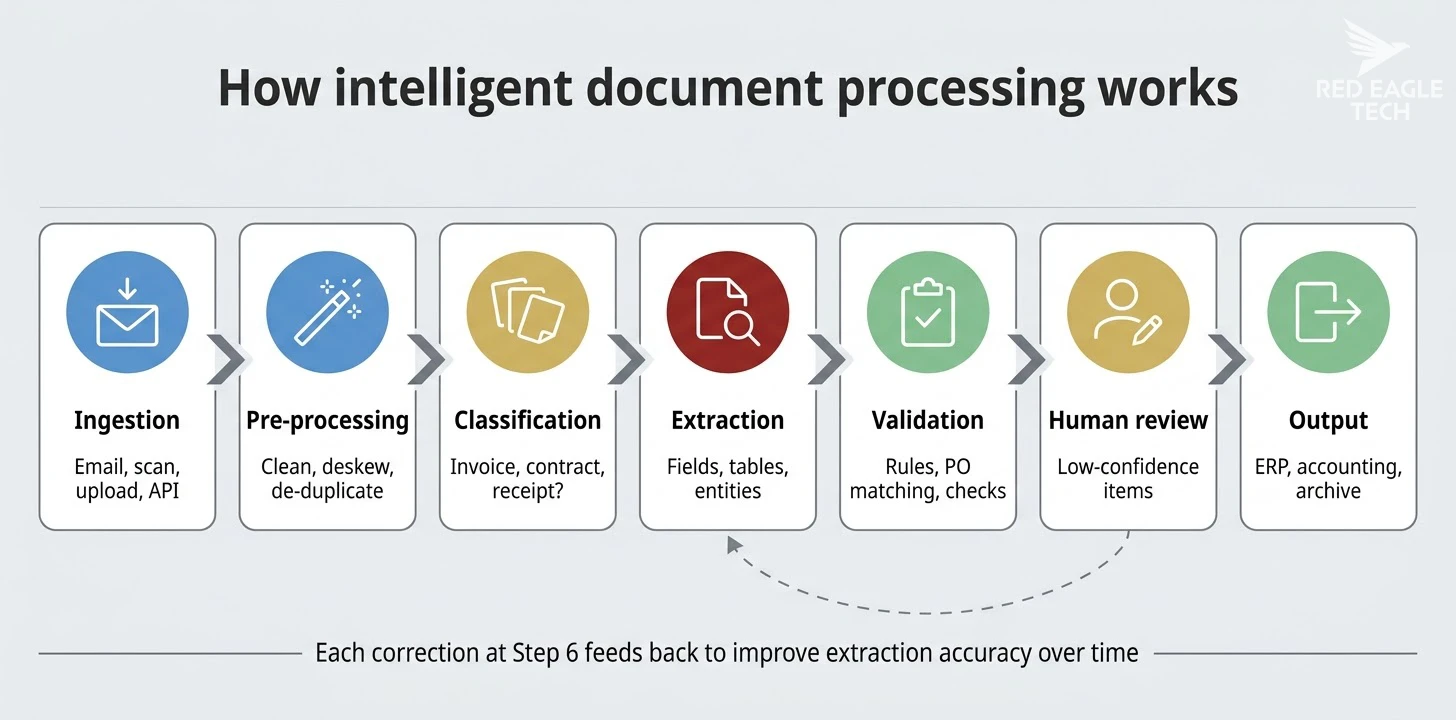
Documents arrive from any source - email attachments, scanned paper, uploaded files, API feeds, shared drives. The system accepts PDFs, images, Word documents and more.
Images get cleaned up - deskewing crooked scans, sharpening faded text, removing noise. This prep step has a big impact on downstream accuracy.
The AI identifies what type of document it's looking at. Is this an invoice, a contract, a receipt, an identity document? Classification determines which extraction model to apply.
The core work happens here. Machine learning models pull out key-value pairs (supplier name, invoice total, due date), table data (line items, quantities, prices) and free-text entities (contract clauses, medical terms). Each extracted field gets a confidence score.
Business rules kick in - does the invoice total match the line items? Is the supplier in your approved vendor list? Do the amounts match the purchase order? Cross-referencing catches errors the extraction might miss.
Low-confidence fields get routed to a human reviewer rather than being accepted blindly. The reviewer's corrections feed back into the model, so accuracy improves with every batch. This "human-in-the-loop" approach is what makes IDP reliable enough for production use.
Validated data flows into your downstream systems - ERP, accounting software, CRM, document management - via APIs or connectors. The document is archived with full audit trail.
The technology stack behind it
Four core AI technologies power this pipeline:
OCR and computer vision
Converts document images into machine-readable text and detects layout elements like tables, checkboxes and signatures. Modern versions use deep learning rather than rule-based pattern matching.
Machine learning
Trained models recognise document structure, extract fields and classify documents. Custom models can be trained on your specific document types with relatively small sample sets.
Natural language processing
Understands meaning in free text - useful for contracts, legal documents and correspondence where data isn't in neat fields but buried in paragraphs.
Rules engines
Business logic for validation, routing and exception handling. Catches errors, enforces compliance rules and decides when human review is needed.
Why UK businesses are investing in document AI
The IDP market is growing fast. Globally, it was valued at roughly £1.7 billion in 2024, with projections reaching £15.8 billion by 2034 - a compound annual growth rate of about 25%. The UK's share of the European market sits at around 18.4%, with the domestic market projected to reach £430 million by 2026.
Behind those numbers are practical pressures UK businesses face every day:
- Late payments are crippling. Late payments cause roughly 38 UK business closures every single day - about 14,000 a year - and cost the economy almost £11 billion annually. UK firms are owed an estimated £26 billion in overdue payments at any given time. Faster invoice processing directly reduces this exposure.
- Labour costs are rising. Manual document processing at scale requires dedicated staff. When invoice processing costs £8 per document and you handle thousands monthly, the maths speaks for itself.
- Errors are expensive. Manual data entry typically carries a 1-3% error rate. For financial documents, those errors cascade into payment delays, supplier disputes, compliance issues and rework.
- Speed matters. Customers and suppliers expect faster turnaround. A mortgage application with 100-200 pages of supporting documents can be processed in hours rather than days.
- Data is trapped. With 80% of business data locked in unstructured documents, organisations miss insights that could improve operations, reduce risk and drive revenue.

Invoice and accounts payable automation
Invoice processing is the most common and often the most rewarding starting point for IDP. It's high-volume, repetitive, rule-bound and directly tied to cash flow - exactly the kind of work where business automation delivers measurable returns quickly.
The manual invoice problem
A typical manual invoice workflow involves receiving the document (paper, email, PDF), keying data into your accounting system, matching it to a purchase order, routing for approval, scheduling payment and filing. Each step introduces delay and the chance of error. Industry figures put the average manual cost at around £8 per invoice when you account for staff time, error correction and late-payment penalties. And exception invoices - the ones that don't match or need chasing - cost three to five times more than clean ones.
What automated invoice processing looks like
With IDP, the end-to-end workflow runs through seven stages:
- Intake - invoices arrive via email, supplier portal, EDI or Peppol and are automatically logged
- Pre-processing - de-duplication checks (catching that invoice you've already received), image clean-up and document classification (invoice vs credit note vs statement)
- AI extraction - the IDP engine pulls out supplier details, line items, totals, VAT and payment terms, tagging each field with a confidence score
- Matching - extracted data is compared against purchase orders and goods receipts (two-way or three-way matching depending on your setup)
- Exception handling - discrepancies flag for human review with prefilled suggested corrections, not a blank screen
- Approval and posting - approved invoices post to your ERP or accounting system and schedule for payment
- Archiving - original documents and extracted data stored with full audit trail (HMRC requires digital records kept for at least six years)
Three-way matching: where the real value sits
For goods purchases, best practice is three-way matching: comparing the invoice against both the purchase order and the goods received note. This catches pricing errors, quantity discrepancies and deliveries that don't match what was ordered. It's the industry standard for a reason - but doing it manually is painfully slow.
AI handles this by applying fuzzy matching (so a slight typo in a supplier name doesn't break the process), tolerance thresholds (auto-approving small variances within, say, 1-3%) and intelligent routing (sending genuine mismatches to the right person with all the context they need). Best-in-class AP operations using this approach keep exception rates below 5%.
What the AI actually extracts from invoices
Modern IDP platforms like Azure AI Document Intelligence offer prebuilt invoice models that extract:
- Supplier name, address and contact details
- Invoice number, date and due date
- Line items with descriptions, quantities, unit prices and totals
- VAT amounts, tax rates and breakdowns
- Payment terms and bank details
- Purchase order references
- Currency codes (for international invoices)
These prebuilt models work out of the box with no training. For non-standard invoice formats specific to your industry, custom models can be trained with as few as five sample documents. Production-grade systems report field-level extraction accuracy in the 95-99% range, with accuracy improving over time as models learn from corrections.
Integrating with your accounting system
The extracted data needs to land in your actual business systems. Common integration patterns for UK businesses include:
- Xero - OAuth 2.0 API integration, well-supported by most AP automation vendors
- Sage - enterprise connectors available from major IDP vendors
- SAP Business One / NetSuite - integration via iPaaS middleware or direct REST/SOAP APIs, with prebuilt connectors enabling go-live in as little as two to four weeks
For businesses running multiple systems, an integration platform (iPaaS) that normalises data between your IDP engine and various ERPs is often the cleanest approach. RPA can bridge gaps with older legacy systems that lack proper APIs, but it's a fallback rather than a first choice.
KPIs to track
Once your automated invoice processing is running, keep an eye on these metrics:
- Straight-through processing (STP) rate - percentage of invoices processed without human intervention
- Exception rate - percentage requiring manual review (target: below 5%)
- Cost per invoice - total processing cost including technology, validation and exceptions
- Cycle time - days from invoice receipt to payment
- First-pass yield - percentage correctly extracted on first attempt
Thinking about automating your invoice processing? We build document processing solutions on Azure for UK businesses. See how our AI solutions service can save your team the most time on document handling.
Contract analysis and legal document processing
Contracts are one of the trickier document types for automation because the valuable data is buried in dense paragraphs of legal text rather than sitting in neat fields. That's where natural language processing earns its keep.
IDP applied to contracts can automatically extract key clauses (termination, liability, indemnity), identify renewal dates and notice periods, flag unusual or non-standard terms, compare contracts against your standard templates and build searchable clause libraries from your existing portfolio. Some platforms can batch-analyse thousands of contracts in minutes - useful for M&A due diligence or regulatory compliance exercises.
UK law firms are well ahead on adoption here. A 2024-25 industry survey found 96% of UK firms have adopted AI in some form, with 56% reporting widespread use. The results from early movers are striking:
- Clifford Chance used machine learning to scan 1,000 employment contracts, automatically excluding 550 from review and delivering the final report a week ahead of schedule - cutting manual effort by over 50%
- Allen & Overy deployed their Harvey AI co-pilot across 3,500 lawyers in 43 offices, handling over 40,000 queries during trial and reporting reductions of up to seven hours per negotiation
- Weightmans reported a 90% reduction in review time and 98% document-search accuracy after integrating AI with their document management system
A controlled benchmark by LawGeex found AI achieved 94% accuracy on contract review tasks compared to 85% for lawyers - and completed the work in seconds rather than hours.
Contract analysis is also the foundation of a wider category of AI applications: full contract lifecycle management. For a comprehensive look at how AI handles contracts from request through to renewal - including obligation tracking, risk scoring and the off-the-shelf vs custom-built decision - see our complete AI contract management guide for UK businesses.
KYC and identity document verification
Know Your Customer (KYC) compliance is a major document processing challenge for UK financial services, legal firms and regulated businesses. A Bank of England and FCA survey in 2024 found 75% of UK financial services firms are already using AI - and the pressure to automate KYC is a big driver. Legacy AML screening systems generate false positive rates of 42-95%, burying compliance teams in manual reviews that add nothing.
IDP automates the heavy lifting: the AI reads identity documents (passports, driving licences, utility bills), extracts relevant fields, runs biometric face-matching and liveness detection, checks document authenticity and cross-references against watchlists, PEP databases and sanctions lists. Low-risk cases flow straight through; only genuine anomalies need human attention.
NatWest's pilot with Mitek cut account-opening time to as little as four minutes, combining geo-location, ID authentication, facial biometrics and proof-of-address checks in a single digital flow. A UK challenger bank reported increasing straight-through processing from 35% to 78% after deploying AI-powered document verification.
The UK's Digital Identity and Attributes Trust Framework (DIATF) is formalising standards for digital identity providers, and GOV.UK One Login now supports passport and driving licence verification via standard authentication flows. If you're building KYC automation, aligning with these emerging standards makes sense for future-proofing.
Mortgage processing is another sweet spot. A typical mortgage application comes with 100-200 pages of supporting documents - payslips, bank statements, identity verification, property valuations. IDP can process the entire pack, extract and validate the key data and flag exceptions, cutting approval times from days to hours.
Healthcare and insurance document processing
Insurance claims automation
Insurance is the UK sector most aggressively adopting AI - 95% of firms are already using it according to the 2024 Bank of England/FCA survey. And it's easy to see why. Claims processing involves parsing police reports, medical records, accident reports and policy documents at scale, then matching everything against policy terms and flagging anomalies.
Aviva's numbers show what's possible. They run over 80 AI models across claims operations, detected 14% more claims fraud in 2024 than the previous year and have more than 150 generative AI use cases in their pipeline. Their earlier automation work uncovered over 12,000 instances of claims fraud worth more than £113 million. On the operational side, they've achieved a 10% reduction in motor claims call-handling time.
IDP handles the document-heavy part of this: extracting structured data from claims submissions regardless of format, matching against policy terms, flagging potential fraud indicators and routing to the right handler. Straight-through processing rates above 90% have been reported in financial services deployments.
Healthcare records and clinical documents
The NHS is piloting AI document processing at scale. Chelsea and Westminster Hospital is running an AI discharge-summary tool as part of the NHS AI Exemplars programme, using an LLM to draft summaries by extracting test results and diagnoses from clinical notes. Across nine London sites, AI notetaking tools were evaluated on over 17,000 patient encounters and saved clinicians two to three minutes per consultation. Oracle Clinical AI Agent pilots are running at Barts Health, Imperial and Milton Keynes.
The challenge in healthcare is the regulatory bar. Any AI tool touching clinical documents must comply with DCB0129 and DCB0160 clinical safety standards, which require hazard logs, clinical safety case reports, DPIAs and ongoing monitoring. That assurance process typically adds 12-18 months to implementation timelines. But for trusts drowning in paperwork, the productivity gains justify the investment.
UK compliance and GDPR considerations
Any document processing system that touches personal data falls under UK GDPR. Since most business documents contain at least some personal information (names, addresses, financial details), compliance isn't optional - it's a baseline requirement for any IDP deployment.
The ICO publishes specific guidance on AI and data protection, organised around UK GDPR principles, plus a practical AI and Data Protection Risk Toolkit (a spreadsheet-based tool for identifying and mitigating risks). These should be your starting points. For a broader look at AI governance obligations, our AI governance guide for UK SMEs covers the full framework. Under Article 22 of UK GDPR, purely automated decisions that have legal or similarly significant effects on individuals face restrictions - the degree and quality of human review you build in determines whether your system is treated as decision-support (fine) or restricted automated decision-making (needs additional safeguards).
Key compliance areas for IDP
Lawful basis
You need a clear lawful basis for processing personal data in documents - typically legitimate interests for business operations or contractual necessity. Document and review this before deployment.
Data Protection Impact Assessment
A DPIA is likely required for AI-powered document processing, particularly when handling high volumes of personal data or making automated decisions. The ICO requires DPIAs for high-risk processing.
Data residency
Know where your data is processed and stored. Cloud IDP services should offer UK or EU data centre options. Ensure your vendor's processor agreements cover UK data protection requirements.
Retention and deletion
Define how long processed documents and extracted data are retained. Implement automated deletion schedules and ensure you can respond to Subject Access Requests covering AI-processed data.
Practical compliance checklist
- Map what personal data your documents contain and identify the lawful basis for processing
- Complete a DPIA before going live with any AI document processing
- Verify your cloud vendor's data residency options and processor agreements
- Implement access controls so only authorised staff can view document data
- Set up audit logging for all document processing activity
- Define retention periods and automated deletion schedules
- Plan for Subject Access Requests - can you find and export all AI-processed data for an individual?
- If processing special category data (health, biometric), apply additional safeguards
- Review vendor subprocessor lists and international transfer mechanisms
Building your IDP solution
For most UK businesses, the practical choice isn't "build from scratch" or "buy a boxed product" - it's building on top of a cloud AI platform and integrating it with your existing systems. Cloud services like Azure AI Document Intelligence provide the AI extraction engine. You bring the business logic, integration and workflow. (If you're weighing up the build-vs-buy question more broadly, our guide to custom AI solutions for UK SMEs covers the decision framework in detail.)
Azure AI Document Intelligence
Microsoft's Azure AI Document Intelligence (formerly Form Recognizer) is a cloud-based service that extracts text, key-value pairs, tables and structure from documents. It's the natural fit if you're already in the Microsoft ecosystem and it works well with .NET, Azure Functions and Logic Apps.
Prebuilt models (no training needed)
| Model | What it extracts | Cost per 1,000 pages |
|---|---|---|
| Invoice | Supplier details, line items, VAT, totals, PO references | ~£7.50 (~0.75p per page) |
| Receipt | Merchant, date, tax, total, VAT breakdown | ~£7.50 |
| ID document | Passports, driving licences - name, DOB, document number | ~£7.50 |
| Contract | Parties, jurisdiction, contract ID, title | ~£7.50 |
| Layout | Document structure, tables, selection marks, handwriting | ~£7.50 |
| Read (OCR only) | Plain text extraction from any document | ~£1.13 |
Custom models
When prebuilt models don't cover your document types, you can train custom models:
- Template models - need just five labelled samples, train in minutes, cost ~£22.50 per 1,000 pages at inference. Best for documents with consistent layouts.
- Neural models - handle variable layouts better, support larger training sets (up to 50,000 pages), take 30 minutes to 12 hours to train. Better for documents with lots of layout variation.
Microsoft recommends targeting 80%+ estimated accuracy as a starting point, with higher targets (near 100%) for financial or medical documents where errors carry real cost.
How it fits into a .NET architecture
A typical Azure-based IDP pipeline looks like this:
- Document ingestion - Azure Blob Storage receives documents via API, email connector, file upload or customer portal
- Event trigger - Event Grid fires on BlobCreated events, routing to your processing pipeline
- Orchestration - Azure Durable Functions manage the multi-step workflow (extraction, validation, human review, output)
- AI extraction - Document Intelligence analyses the document and returns structured JSON with extracted fields and confidence scores
- Validation - Your .NET business logic validates extracted data against your rules (PO matching, amount thresholds, vendor checks)
- Human review - Low-confidence results (below your threshold - typically 0.85-0.95) route to a review interface
- ERP output - Validated data pushes to your accounting system via API or connector (Logic Apps supports Sage, SAP, Dynamics connectors)
- Audit and archive - Raw documents, extracted JSON and processing metadata stored with full audit trail

Other cloud options
Azure isn't the only option. Google's Document AI and AWS Textract offer comparable extraction capabilities with similar per-page pricing models. The right choice depends on your existing cloud infrastructure, team skills and specific document types. All three support prebuilt and custom models, per-page pricing and API-based integration. We use Azure because it integrates naturally with our .NET stack and the Microsoft ecosystem most UK businesses already run. Our software engineering team builds these pipelines using Azure and .NET as standard.
ROI: the business case for document processing automation
The numbers from real deployments are hard to argue with. Here's what documented cases show:
| Organisation | Use case | Result |
|---|---|---|
| Royal Bank of Scotland | KYC document processing | 100,000-200,000 manual hours saved per year |
| e-docs UK | Proof of delivery processing | Over £100,000 annual savings |
| Tungsten Automation client | Invoice processing | Cost per invoice reduced from £8 to £2 |
| UiPath / UWM | Loan document processing | Processing time from 3 minutes to 30 seconds |
| Hyperscience client | Financial services forms | 94%+ straight-through processing, 15x throughput |
Building your own business case
To calculate potential ROI for your organisation, you need four numbers:
- Current cost per document - staff time (minutes per document x hourly rate), plus rework and error costs
- Monthly document volume - how many documents of each type you process
- Expected automation rate - what percentage will be processed without human intervention (typically 70-90% for standard document types)
- Implementation cost - integration development, model training, change management and ongoing per-page processing fees
A simple example: if you process 5,000 invoices monthly at a manual cost of £8 each, your baseline is £480,000 annually. An 80% automation rate with per-page processing costs of a few pence brings that down to roughly £120,000 - a saving of £360,000 per year before accounting for implementation costs.
Want to build a business case for your organisation? We can help you estimate the ROI for your specific document volumes and processes. Give us a shout and we'll walk through the numbers with you.
Getting started: your first IDP pilot
The most successful IDP deployments start small and scale based on proven results. Whether you build in-house or work with an AI solutions partner, here's a practical path:

Choose a single, high-volume document type with clear business value. Invoices are the most common starting point because prebuilt models handle them well, the ROI is straightforward to measure and the process is well understood.
Set up your cloud service (Azure AI Document Intelligence or equivalent), run a batch of real documents through the prebuilt model and measure extraction accuracy. Build the validation logic and review interface.
Run the pilot alongside your existing process. Compare accuracy, speed and cost. Integrate with your ERP or accounting system. Train custom models if the prebuilt ones don't cover your document formats.
Expand to additional document types based on pilot learnings. Add more complex use cases (contracts, KYC, claims). Build out governance, monitoring and exception handling for production use.
Realistic timelines
Based on real deployment data, here's what the full journey typically looks like:
| Phase | Duration | What happens |
|---|---|---|
| Discovery and planning | 2-6 weeks | Stakeholder mapping, pilot selection, data access checks, DPIA planning, baseline measurement |
| Proof of concept | 4-8 weeks | Label sample data, test prebuilt models, build minimal extraction pipeline, measure accuracy |
| Pilot / MVP | 6-12 weeks | Expand dataset, add validation and human review, integrate with ERP, instrument monitoring |
| Production rollout | 8-16 weeks | Harden security, scale testing, DR planning, SLA definitions, production cutover |
| Optimisation | Ongoing | Reduce exception rates, add document types, retrain models, tune thresholds |
A basic IDP project needs around 150 development hours minimum. Substantial projects with custom models and ERP integration run to 1,000-2,500 hours. The team typically needs a solution architect, .NET developers, a data engineer for model training and a business analyst who understands the documents.
Frequently asked questions
Sources
- GM Insights (2024). Intelligent Document Processing Market Analysis.
- Fortune Business Insights (2025). Intelligent Document Processing Market Report.
- Market Data Forecast (2024). Europe Intelligent Document Processing Market.
- Edge Delta (2025). What Percentage of Data is Unstructured?
- ABBYY (2024). e-docs UK Customer Story - FlexiCapture Deployment.
- Evolution AI (2025). Intelligent Document Processing Use Cases.
- Tungsten Automation (2024). 5 Case Studies to Inspire Your AP Automation Strategy.
- UiPath (2024). UWM Accelerates Loan Processing with Document Understanding.
- Hyperscience (2023). Ultimate Guide to Intelligent Document Processing.
- Microsoft (2025). Azure AI Document Intelligence - Product Documentation.
- Braincuber (2025). Case Study: AI Document Processing.
- Capital Economics / DCMS (2022). AI Activity in UK Businesses Report.
- ICO (2023). Guidance on AI and Data Protection.
- Artsyl (2025). AI-Powered PO Matching: Accuracy and Cost Reduction Study.
- KPMG UK (2023). Automation of Invoice Processing.
- Peppol.nu (2025). UK E-invoicing Mandate Starting April 2029.
- THP Chartered Accountants (2025). UK E-invoicing Mandate Guide.
- HMRC (2025). Making Tax Digital - Invoice Requirements.
- Bank of England / FCA (2024). Artificial Intelligence in UK Financial Services Report.
- Diginomica (2025). Weightmans: AI Gives Us 98% Document Search and Analysis Accuracy.
- Clifford Chance (2024). Employment Litigation ML Case Study.
- Allen & Overy / Harvey (2023). ContractMatrix and AI Co-pilot Deployment.
- LawGeex (2024). Comparing AI and Lawyer Contract Review Accuracy.
- Mitek / NatWest (2024). Digital Onboarding Case Study.
- ICO (2023). Onfido Regulatory Sandbox Report.
- NHS England (2025). Guidance on AI-Enabled Ambient Scribing Products.
- Aviva (2025). Claims Fraud Detection - Annual Report.
- PRA (2023). Supervisory Statement SS1/23: Model Risk Management.
- SRA (2025). Technology in Legal Services Report.
- ICO (2025). AI and Data Protection Risk Toolkit.
- UK Government (2025). AI Opportunities Action Plan - One Year On.
- UK Government (2025). Late Payments Research - Impact on UK Economy.
- GoCardless / FSB (2025). UK Late Payments Report.
- Microsoft (2025). Azure AI Document Intelligence - What's New.
- DocuWare (2025). Stuart Plumbing & Heating Case Study.





