
Your customers want answers at 10pm on a Tuesday. They want to check where their order is, download an invoice, upload that signed contract or log a support ticket - and they want to do it without waiting for someone on your team to pick up the phone.
That's what customer portals do. They give your clients a secure login where they can help themselves, and they give your team breathing room by handling the routine queries that eat up half the working day. For the 5.7 million businesses in the UK, portals have gone from "nice-to-have" to a baseline expectation - 87% of UK adults already bank online, and that self-service mindset has spread into every industry.
This guide covers everything you need to know. We'll walk through what customer portal software actually is, when off-the-shelf products work and when they don't, which AI features are worth paying attention to in 2026, and how UK businesses across different sectors are using portals to cut costs, keep customers happy and stay on the right side of GDPR.
1. What are customer portals?
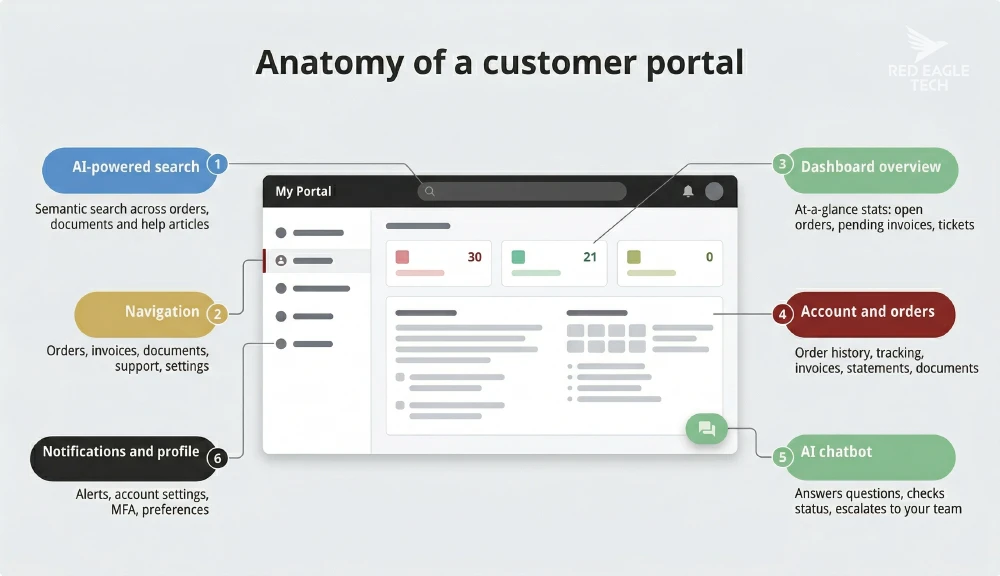
A customer portal is a secure, private area of your website (or a standalone web app) where your customers log in to interact with your business. Think of it as a self-service front desk that never closes. Depending on your business, a portal might let customers check order status, view and pay invoices, upload documents, track project progress, book appointments or raise support tickets.

You'll see different names used - customer portal, client portal, self-service portal - and the distinction mostly comes down to your industry. Professional services firms (solicitors, accountants, consultants) tend to call them client portals. Product and service businesses usually say customer portals. The underlying concept is the same: give people a login so they can get what they need without waiting for your team.
How portals differ from other systems
It's easy to confuse portals with other business software, so here's how they fit together:
| System | Who uses it | Purpose |
|---|---|---|
| Customer portal | Your customers/clients | Self-service access to their account, orders, documents and support |
| CRM | Your internal team | Managing customer data, sales pipelines and communications |
| Intranet | Your employees | Internal comms, HR processes and company resources |
| Extranet | Partners and suppliers | B2B collaboration, shared inventory and partner workflows |
The key thing to understand is that a portal is the customer-facing interface that sits on top of your internal systems. Your CRM holds the customer data; your portal lets the customer see and interact with their own slice of that data. Your ERP tracks inventory; your portal lets the customer check what's in stock and place orders. The portal doesn't replace these systems - it connects to them and gives your customers a window into the bits that matter to them.
Types of customer portal
Not all portals are built the same way. The right type depends on what your customers need from you:
B2B order portals
Your trade customers log in to place orders, check stock, view pricing and download invoices. Common in distribution, wholesale and manufacturing.
Support and self-service portals
Customers raise tickets, search a knowledge base, track issue status and access FAQs. Reduces call volume and speeds up resolution times.
Document exchange portals
Secure upload, download and signing of documents. Used heavily by solicitors, accountants and regulated sectors where audit trails matter.
Project collaboration portals
Clients track project progress, review deliverables, approve milestones and communicate with your team. Popular with agencies and consultancies.
Why UK businesses are investing
The shift to portals isn't a technology trend for its own sake - it's being driven by customer behaviour and business economics.
On the customer side, expectations have moved permanently. A 2024 Acquia study found that 77% of UK respondents said their expectations for digital experiences with brands changed during the pandemic - and those expectations haven't gone back down. People are used to checking their bank balance at midnight, tracking a parcel in real time and filing their tax return on a Saturday morning. When they interact with a business that still relies on phone calls and emails for everything, it feels slow.
On the business side, the maths is straightforward. ContactBabel's UK contact centre research puts the average cost of an inbound call at £5.58. If your customer could have found the answer themselves through a portal, that's £5.58 saved per deflected call. Multiply that across hundreds or thousands of routine queries per month - order status checks, invoice requests, booking confirmations - and the savings add up quickly.
There are regulatory drivers too. HMRC's Making Tax Digital programme is rolling out in stages from April 2026, pushing more businesses toward digital interfaces for tax submissions and agent interactions. The FCA's Consumer Duty rules are tightening expectations around the digital interfaces financial services firms use for customer communications. And UK GDPR means any business collecting and processing customer data needs proper systems in place - a well-built portal with access controls and audit trails is a much stronger compliance position than spreadsheets and email attachments.
2. Off-the-shelf vs custom-built
One of the first decisions you'll face is whether to use an existing portal product or have something built specifically for your business. Both routes have their place, and the right answer depends on how standard your processes are and how deeply the portal needs to integrate with your existing systems.
When off-the-shelf works well
If your needs are relatively standard - you want customers to raise support tickets, read a knowledge base, check order status and pay invoices - there are solid products that can get you up and running in a few weeks. Platforms like Zendesk, Freshdesk, HubSpot and ServiceNow all offer portal modules alongside their core products, typically priced per user per month.
The advantages are clear: faster time to launch, lower upfront cost, and the vendor handles maintenance and updates. For a small business with straightforward customer interactions, this is often the sensible starting point.
When off-the-shelf starts to creak
The cracks tend to show up in a few predictable places:
- Integration depth. Your customers want to see real-time stock levels from your warehouse system, or their account balance synced from Sage, or job status pulled from your scheduling tool. Off-the-shelf portals offer integrations, but they're usually broad connectors rather than deep, two-way data flows with your specific systems.
- Unique workflows. A B2B distributor whose customers have negotiated pricing tiers, credit terms and approval chains can't easily shoehorn that into a generic portal. Nor can a solicitor who needs granular access controls on case files by matter, client and party.
- Branding and experience. Generic portal UIs look generic. If your portal is a core part of how customers experience your brand, the ability to craft a distinctive, polished interface matters.
- Compliance and audit. Regulated sectors need specific logging, data residency controls and access patterns that off-the-shelf products may not support without expensive enterprise tiers.
- Scale and cost. Per-seat pricing works at small scale but can become expensive as your user base grows. A custom-built portal has a higher upfront cost but no per-user licensing fee.
The decision framework
| Factor | Off-the-shelf | Custom-built |
|---|---|---|
| Time to launch | 2-6 weeks | 3-6 months |
| Upfront cost | Low (subscription-based) | Higher (project-based) |
| Ongoing cost | Per-user licensing (grows with users) | Hosting + maintenance (fixed-ish) |
| Integration depth | Standard connectors | As deep as you need |
| Unique workflows | Limited to product features | Built around your processes |
| Branding control | Themes and colour options | Fully bespoke UI/UX |
| Compliance control | Depends on vendor tier | Full control over data, logging, residency |
| Maintenance | Vendor handles updates | Your team or your development partner |
| Best for | Standard support/KB, simple account management | Complex B2B, regulated sectors, competitive differentiator |
The hybrid approach
In practice, many UK businesses end up somewhere in the middle. You might start with an off-the-shelf portal to validate demand and get quick wins, then move to a custom-built solution once you understand exactly what your customers need. Or you might use a low-code platform for the portal's front end while building custom integrations to connect it properly with your backend systems.
The key is to avoid two common traps: spending six months building a custom portal before you've validated what customers actually want, or persisting with an off-the-shelf product that's being stretched beyond what it was designed to do (the "we've customised it so heavily it's basically custom anyway, but with vendor lock-in" scenario).
Watch out for hidden costs. Off-the-shelf portal products often advertise low starting prices but charge extra for features like SSO, advanced permissions, API access, custom domains and audit logging. Check the full-tier pricing against your actual requirements before committing - the feature you need most might only be available on the enterprise plan.
Thinking about building a customer portal? We build custom portal solutions on Azure for UK businesses - from simple client document exchanges to complex B2B order platforms - through our bespoke software development service. Take a look and see which approach would work best for what you need.
3. Key features every portal needs
Not every portal needs every feature on day one. The trick is to nail the basics that stop customers from phoning you, then layer on the clever stuff once you've got solid foundations. Here's how the features stack up.
The essentials
These are the features your customers will expect from day one. Skip any of these and you'll end up fielding the same queries by phone and email that the portal was meant to handle:
Account management
Customers update their own contact details, billing address and payment methods. Sounds basic, but it's one of the biggest call drivers.
Order history and tracking
Past orders, current fulfilment status and delivery updates. "Where's my order?" is consistently the top inbound query for product businesses.
Invoices and statements
Downloadable invoices, statements and tax documents. Saves your accounts team from fielding "can you resend my invoice?" requests.
Support tickets
Raise, track and respond to support requests. Customers can see status updates without chasing, and your team gets structured data instead of messy email threads.
Knowledge base
Searchable help articles, FAQs and how-to guides. Well-written KB content deflects tickets before they're even raised.
Secure document exchange
Upload, download and share files with proper access controls. Replaces the "please find attached" email chains with something audit-friendly.
AI-powered features worth paying attention to
This is where portals are moving fast in 2026. AI features are no longer experimental extras - they're starting to deliver measurable results for UK businesses:
Intelligent chatbots
AI assistants that handle routine queries, check order status, walk customers through troubleshooting and escalate to your team when they can't resolve something. Well-implemented bots hit 70-85% automation rates and can cut response times dramatically. For the build-vs-buy decision and the seven UK 2026 cost paths from £30/month SaaS to £250k+ enterprise, see our AI chatbot development guide.
A Manchester e-commerce retailer using AI chat support cut response times from 24 hours to under two minutes and halved the support team from six to three staff.
Bestech Solutions, 2025
Smart search
Semantic search that understands what your customer means, not just the exact words they type. Instead of keyword matching, it uses AI embeddings to find relevant answers even when the phrasing doesn't match. Particularly valuable for large knowledge bases and document libraries.
Document processing
Customers upload invoices, receipts, contracts or ID documents and AI extracts the data automatically. Intelligent document processing can reduce manual data entry by up to 80% and cut processing time by around 70%. Useful for onboarding, claims and compliance workflows.
Personalisation and predictions
AI-driven reorder prompts, product recommendations, maintenance reminders and churn predictions. One UK retailer saw a 25% conversion uplift and 15% rise in average order value after adding AI personalisation to their portal.
Security features you can't skip
Any portal handling customer data needs proper security. These aren't optional extras - they're baseline requirements, especially under UK GDPR:
- Multi-factor authentication (MFA). A second verification step beyond passwords. The NCSC recommends MFA for any system handling sensitive data. Authenticator apps and passkeys are replacing SMS codes as the preferred second factor.
- Role-based access control (RBAC). Different users see different things. Your B2B customer's purchasing manager sees orders and invoices; their accounts team sees statements; their admin manages user access. RBAC makes this manageable.
- Single sign-on (SSO). Lets enterprise customers log in with their existing company credentials (via protocols like OpenID Connect or SAML). Reduces password fatigue and gives IT departments better control over who has access.
- Encryption. Data encrypted in transit (TLS) and at rest. Non-negotiable for anything involving personal or financial data.
- Audit logging. A record of who accessed what and when. Required for regulated sectors and genuinely useful for troubleshooting and compliance evidence.
Don't forget mobile. Between 50% and 66% of UK web traffic now comes from mobile devices. If your portal doesn't work well on a phone, you've lost half your audience before they've logged in. Responsive design isn't a nice-to-have - it's table stakes.
4. How different sectors use portals
The best way to understand what a customer portal can do for your business is to see how businesses like yours are already using them. Here are six UK sectors where portals are making a measurable difference.

Legal: client portals for law firms
Solicitors and law firms are under growing pressure from the SRA to improve price transparency and modernise how they communicate with clients. Client portals address both.
A typical legal client portal handles secure document exchange (contracts, correspondence, court documents), billing transparency, case progress updates and onboarding automation. The key requirement is granular access control - different parties on the same matter may need to see different documents, and everything needs an audit trail.
The numbers are encouraging. Bell Lamb & Joynson reported saving 30 minutes on every new file after implementing a client portal and saw a 50% increase in conveyancing work. GloverPriest's secretarial team saved 5-10 minutes per case through automated communications, freeing roughly 5% of their working day. That said, the sector has room to grow - a LawNet survey found only 41% of law firm professionals rated their firm's digital client experience positively.
Accounting: document collection and MTD compliance
For accountancy practices, client portals solve a persistent headache: getting documents from clients on time. Instead of chasing receipts and bank statements by email, a portal lets clients upload everything to a secure, organised space where the practice can see what's arrived and what's still missing.
With HMRC's Making Tax Digital programme rolling out from April 2026, the regulatory push toward digital is accelerating. Tools like Hubdoc, Dext and Xero HQ let practices automate data capture from client-uploaded documents, extract key figures and feed them straight into the accounting system - cutting manual data entry significantly.
The practice Freedom in Numbers reported 300% business growth after adopting automated document capture through Hubdoc and Xero, and eliminated a full day of manual data entry every week. Over 250,000 accountants and bookkeepers now use the Xero platform, giving some sense of how mainstream this shift has become.
Trades and field service: job tracking and customer comms
Plumbers, electricians, builders and HVAC engineers are increasingly using field service apps with customer-facing features - SMS appointment reminders, technician arrival notifications, online quote acceptance and digital invoicing. It's not a traditional "portal" with a login, but the customer-facing functionality serves the same purpose.
Finbra Plumbing & Heating now processes 99% of their invoices through ServiceM8, automatically synced to Xero. One plumbing company used workflow automation to slash quote turnaround from 18 hours to under 10 minutes and cut manual admin tasks by 80% within four months.
For trades businesses, the portal value proposition is less about self-service and more about professionalism and speed. Customers get instant quotes, real-time job updates and digital invoices - and the business spends less time on paperwork and more time on billable work.
B2B distribution: order portals and ERP integration
This is where customer portals deliver some of the most dramatic ROI. B2B distributors and wholesalers use order portals to let trade customers check real-time stock levels, place orders at their negotiated pricing, view account balances and download invoices - all integrated directly with the ERP system.
One UK distributor processed over £30 million in orders through their custom portal in 2025, with real-time stock feeds, customer-specific pricing from the ERP, credit limit enforcement at checkout and automatic sales order creation. The portal runs with minimal upkeep because the ERP remains the single source of truth for pricing and stock data.
Robert Lee, the UK's largest independent bathroom and plumbing distributor, uses a portal integrated with Microsoft Dynamics. Inspecs Eyewear connects their ordering portal to Sage via middleware. The common thread is deep ERP integration - without it, you're maintaining pricing and stock data in two places, which is a recipe for errors and customer complaints.
Property management: tenant and landlord portals
Letting agents and property managers use portals for maintenance request reporting, rent payment collection, tenancy document access and e-signatures. The big driver here is time - research from AskLettie found that 34% of landlords spend two or more hours per month just on maintenance tasks, and a significant share handle maintenance queries outside business hours.
Allsop Letting & Management adopted Yardi's residential suite including the RentCafe tenant portal for online payments, marketing and e-signatures. AI-assisted maintenance triage is an emerging feature, with early adopters reporting meaningful cost savings through predictive maintenance - though only 7% of agents say AI has genuinely transformed their operations so far. The opportunity is real but the sector is still early in adoption.
Healthcare: patient portals at scale
Healthcare offers the most dramatic example of portal adoption in the UK. The NHS App now has nearly 40 million registered users in England. In a single 12-month period, patients used it to order 67.8 million repeat prescriptions. In November 2025 alone, the app recorded 62.3 million logins, 20.8 million GP record views and 6.6 million hospital appointment management actions.
In the private sector, hospital patient portal activation rates vary - a 2024 study across two London teaching hospitals found an overall activation rate of 52.7% across nearly 500,000 patients, with women (56.1%) activating more than men (48.3%) and peak activation among 31-40 year olds (70.6%).
The healthcare lesson for other sectors is clear: when people can genuinely do useful things through a portal (order prescriptions, book appointments, view records), adoption follows. The NHS App didn't hit 40 million users because it was mandated - it got there because it saved people a phone call.
5. How customer portals work

You don't need to be technical to understand what's happening behind the scenes. A customer portal is a secure website that talks to your existing business systems through connections called APIs (application programming interfaces). Here's the simplified version of what happens when a customer uses your portal.
What happens when a customer logs in
Your customer enters their email and password (or uses single sign-on from their company's system). If you've got MFA enabled, they confirm with a code from their authenticator app. The portal verifies their identity and issues a secure session token.
The portal asks your backend systems for the customer's data - their profile, recent orders, outstanding invoices, open tickets. These requests go through an API gateway, which acts as a secure gatekeeper checking that the customer is allowed to see what they're asking for.
Your backend services pull data from wherever it lives - your CRM, ERP, accounting system, warehouse management tool. This can happen in real time (the portal asks Sage for the latest invoice right now) or from a cache (a copy that's refreshed every few minutes).
The data comes back and the portal renders the customer's dashboard - their orders, documents, tickets, whatever's relevant. If they ask the chatbot a question, that query goes to an AI service as part of the same flow.
Throughout the whole process, sensitive data is encrypted, API credentials are stored in a secure vault (not in the code), and an audit log records who accessed what and when.
Where does a portal live?
Most modern portals run on cloud infrastructure. For UK businesses, the main options are:
- Microsoft Azure has UK South and UK West data centres, which means your data stays in the UK. Azure also provides identity services (Azure AD B2C), AI services and integration tools that work well together for portal builds. This is the stack we use at Red Eagle Tech.
- Amazon Web Services (AWS) and Google Cloud both have UK regions too. The choice between providers usually comes down to what your team already knows, what your other systems run on and any specific compliance requirements.
One thing worth noting: if you use a US-owned cloud provider (Azure, AWS, Google), your data could technically be subject to the US CLOUD Act even when hosted in a UK data centre. For most businesses this isn't a practical concern, but if you're in a highly regulated sector or handling particularly sensitive data, it's worth discussing with your legal team.
Real-time vs batch: how data stays in sync
When a customer places an order or your warehouse ships a package, how quickly does the portal reflect that change?
- Real-time sync uses webhooks and event-driven architecture. When something changes in your backend system (a payment clears, an order ships), it immediately notifies the portal. This gives customers up-to-the-second accuracy but is more complex to build and maintain.
- Batch sync updates on a schedule - every few minutes, hourly, or daily. Simpler to implement and perfectly fine for data that doesn't change by the second (think: invoices, account statements, project documents).
In practice, most portals use a mix of both. Real-time events for the things customers care about most (order status, payment confirmations, support ticket updates) and batch sync for everything else.
API-first architecture
You'll hear the term "API-first" a lot in portal discussions. It simply means designing your portal's data connections (APIs) as a deliberate first step rather than bolting them on afterwards. The benefit is that once you've built clean APIs for your portal, those same APIs can be reused by mobile apps, partner integrations or other tools down the line. It's a bit more work upfront but saves significant time and cost as your digital presence grows.
Wondering how a portal would connect to your systems? We specialise in building custom integrations that connect portals to Sage, Xero, Dynamics 365 and other UK business systems. Get in touch and we'll walk through what's involved for your setup.
6. UK GDPR and compliance
Any customer portal that handles personal data - names, email addresses, order histories, uploaded documents, payment details - falls under UK GDPR. That covers pretty much every portal. The good news is that a well-designed portal actually strengthens your compliance position compared to the alternative (data scattered across email inboxes, shared drives and spreadsheets). Here's what you need to get right.
Choosing your lawful basis
You need a documented legal reason for processing each type of personal data in your portal. The ICO recognises six lawful bases, but for most portal features you'll use one of three:
- Contract. Processing that's necessary to fulfil a contract with the customer. This covers the core portal features - account management, order history, invoice access, support tickets. If someone has a service agreement or purchase contract with you, showing them their own data is necessary to deliver that service.
- Legitimate interests. Processing that's necessary for your legitimate business interests, provided those interests don't override the individual's rights. This covers things like security logging, fraud detection and basic analytics. You'll need to carry out and document a legitimate interests assessment (LIA) for each use.
- Consent. Where neither contract nor legitimate interests applies - typically for marketing communications, non-essential cookies and behavioural tracking. Consent must be freely given, specific, informed and involve a clear positive action. You'll need to record it and make it easy to withdraw.
Don't rely on consent where you don't need to. A common mistake is using consent as the lawful basis for everything. This creates unnecessary friction (consent pop-ups for basic account features) and risk (if a customer withdraws consent, do you have to delete their order history?). Use contract or legitimate interests where they genuinely apply, and reserve consent for the areas where it's actually required.
When you need a DPIA
A Data Protection Impact Assessment is required when your portal processing is likely to result in high risk to individuals. The ICO says you should carry out a DPIA if your portal involves:
- Large-scale profiling or automated decision-making (e.g., AI-driven churn scoring that affects service levels)
- Processing special category data in bulk (health records, biometric authentication)
- Systematic monitoring of publicly accessible areas
- Use of new technologies where the privacy impact isn't well understood
For most standard customer portals (account management, orders, support tickets), a DPIA may not be strictly required - but it's still good practice. The exercise forces you to think through data flows, risks and mitigations before you build, which tends to produce a better, more secure portal.
Data retention and deletion
Don't keep customer data longer than you need it. That's the principle, but putting it into practice means writing a retention policy that specifies how long each type of data is kept and why. Some categories have clear retention periods (financial records are typically kept for six years for tax purposes), while others need a business justification.
Build automated retention into the portal from the start - expired support tickets archived after 12 months, inactive accounts flagged after 24 months, uploaded documents deleted after the relevant matter is closed. Doing this manually at scale doesn't work.
Data subject access requests
Under UK GDPR, your customers have the right to request a copy of all personal data you hold about them. You must respond within one month (extendable by two months for complex requests). A well-built portal can make this easier by including a self-service data export feature - the customer clicks a button, gets a download of their data, and you've handled the request without manual work.
Data residency and international transfers
If your portal data stays in the UK, this is straightforward. If data leaves the UK (for example, through a cloud provider's infrastructure or a third-party service), you need to follow the ICO's updated three-step test for international transfers and ensure appropriate safeguards are in place - typically UK Standard Contractual Clauses (SCCs) or reliance on an adequacy decision.
For most UK businesses hosting on Azure, AWS or Google Cloud with UK data centres, the practical risk is low. But it's worth confirming that each service you use actually processes data in the UK region, especially managed services like AI and analytics that may route through other locations.
Cookies in authenticated areas
A portal login area doesn't exempt you from cookie consent requirements. Session cookies that are strictly necessary for authentication don't require consent, but analytics tracking, behavioural profiling and third-party marketing cookies still do - even behind a login wall. The ICO's updated draft cookie guidance (following the Data Use and Access Act 2025) has expanded scope to cover tracking pixels, web storage and browser fingerprinting alongside traditional cookies.
Sector-specific requirements
Beyond UK GDPR, your sector may have additional compliance obligations:
- Legal (SRA). The Solicitors Regulation Authority expects secure handling of client information and has active guidance on client money rules and price transparency - both directly relevant to portal features handling billing and document exchange.
- Financial services (FCA). The Consumer Duty rules tighten expectations for digital customer interfaces, requiring firms to demonstrate good outcomes for customers across their digital channels.
- Tax services (HMRC MTD). Portals integrating with Making Tax Digital must use HMRC APIs and follow their authentication and data format requirements. HMRC estimates average transitional costs of around £330 per business for MTD compliance.
- Payments (PCI DSS). If your portal handles card payment data, PCI DSS applies. The standard practice is to use tokenisation through a payment provider (Stripe, GoCardless) so your portal never touches full card numbers, which significantly reduces your PCI scope.
7. Planning and building your portal

Whether you go off-the-shelf or custom-built, portal projects follow a similar path. Here's a practical roadmap based on how successful UK implementations typically run.
Map your top customer journeys. Which tasks generate the most inbound calls and emails? Interview a handful of customers about what they'd want from a self-service portal. Audit your existing systems (CRM, ERP, accounting) and their APIs. Check your GDPR position - what data will the portal process, and what's your lawful basis? Define your success metrics before you build anything.
Sketch the portal's key screens and user flows. Test these with real customers before writing a line of code - you'll catch assumptions early and avoid expensive rework later. Define your API contracts (what data flows where) and make security decisions (authentication method, encryption approach, access control model).
Build the minimum set of features that deliver real value. For most businesses, that's authentication, an account dashboard, support ticketing, a knowledge base and one or two key integrations (CRM read, invoice view). Use an API-first approach so you're building clean connections that can be extended later. Set up CI/CD pipelines from the start - automated testing and deployment will save you pain down the line.
Roll out to a small group of customers - your most engaged accounts or a specific segment. Monitor everything: adoption rates, feature usage, ticket deflection, customer feedback. Run security testing and accessibility checks. Hold a retrospective after the pilot to capture what worked, what didn't and what needs changing before wider rollout.
Expand to your full customer base in stages - by segment, region or product line. Each wave should be accompanied by communications (email announcing the portal, training materials, video walkthroughs if helpful). Keep monitoring your KPIs and iterating based on real usage data.
A portal isn't a "build it and forget it" project. Monitor performance, track customer satisfaction, refresh knowledge base content, apply security patches and add new features based on what your customers are actually asking for. Budget 15-20% of your original build cost per year for ongoing maintenance and improvement.
Common mistakes to avoid
- Over-engineering Phase 1. The biggest killer of portal projects is trying to build everything at once. Start with the features that deflect the most support queries and add complexity later.
- Skipping user research. Building a portal based on what you think customers want, rather than what they actually need, leads to low adoption. Even a handful of customer conversations will redirect your priorities.
- Poor backend integration. A portal showing stale or incorrect data is worse than no portal at all. Test your integrations thoroughly, especially real-time data feeds for orders, stock and payments.
- No change management. If your team doesn't know the portal exists, they can't direct customers to it. Internal training and clear communications are as important as the technology.
- Not measuring anything. If you can't show ticket deflection numbers, adoption rates and customer satisfaction scores, you can't prove the portal is working - and you can't make a case for further investment.
8. Costs, ROI and the business case
Let's talk money. Portal projects can range from a few thousand pounds for a simple off-the-shelf setup to six figures for a complex custom build. The right budget depends on what you're building, how deeply it needs to integrate, and how many people will use it.
What things cost
| Approach | Upfront cost | Ongoing cost | Best for |
|---|---|---|---|
| Off-the-shelf SaaS | £2,500-£25,000 (implementation) | £12-£115 per agent/month | Small teams, standard support/KB |
| Custom MVP | £15,000-£60,000 | 15-20% of build cost/year (maintenance + hosting) | Focused first version, validating demand |
| Custom mid-scale | £75,000-£220,000 | 15-20% of build cost/year | Integrations, compliance, B2B workflows |
| Custom enterprise | £200,000-£500,000+ | 15-20% of build cost/year | Large user base, complex integrations, full control |
For context, typical UK development agency day rates sit around £500/day for developers, £600-£800/day for architects and tech leads, and £400-£600/day for UX designers. A focused custom MVP might involve 30-120 development days depending on complexity.
Where the savings come from
Portal ROI typically shows up in four places:
- Support ticket deflection. With the average UK inbound call costing £5.58 (ContactBabel), deflecting even 30% of routine queries to self-service adds up fast. A business fielding 2,000 calls per month that deflects 30% would save roughly £40,000 per year in call handling costs alone.
- Staff time freed up. When customers can download their own invoices, track their own orders and update their own details, your team stops being a human relay. One UK university that built a custom admissions portal for £45,000 reported annual time savings worth £60,000 - a payback period of under nine months.
- Faster payments. B2B portals that show outstanding invoices and offer online payment consistently reduce days sales outstanding (DSO). One UK distributor using an AR portal cut DSO by 12 days.
- Revenue through convenience. B2B order portals make it easy for trade customers to reorder, check stock and place orders outside business hours. The UK distributor processing £30m through their portal is a clear example of revenue enabled by self-service access.

Three-year total cost of ownership
The build-vs-buy maths depends on team size, customer volume and how much you need beyond a basic helpdesk. A common mistake in these comparisons is only counting SaaS agent seat fees - in reality, a full SaaS portal stack includes enterprise add-ons (SSO, audit logging, AI features), integration middleware and customisation work on top of the platform. Here's how the full costs compare over three years:
These figures are illustrative. Real-world portal costs vary widely depending on your industry, the complexity of your workflows, how many systems need integrating, your compliance requirements and how bespoke the user experience needs to be. A straightforward support portal for a retail business will cost a fraction of a regulated B2B order platform with deep ERP integration. Use these ranges as a starting point to get a rough feel for what it might look like.
| Scenario | SaaS (3-year total) | Custom (3-year total) | Winner |
|---|---|---|---|
| Small team 2 agents, 5k customers, basic KB and ticketing |
~£12,000 Seats + setup |
~£65,000 £40k build + maintenance + hosting |
SaaS (by a wide margin) |
| Growing 5 agents, 15k customers, CRM + payment integration |
~£50,000 Seats + add-ons + iPaaS + config |
~£105,000 £70k build + maintenance + hosting |
SaaS still ahead |
| Mid-market 15 agents, 50k customers, ERP + compliance needs |
~£150,000 Enterprise seats + add-ons + iPaaS + customisation |
~£165,000 £110k build + maintenance + hosting |
Roughly even |
| Enterprise 50 agents, 200k+ customers, deep integrations |
~£400,000 Enterprise seats + add-ons + iPaaS + ongoing customisation |
~£300,000 £180k build + maintenance + hosting |
Custom wins |
The pattern: SaaS per-agent pricing is very attractive for small teams, but the costs scale linearly as you add agents, bolt on enterprise features and pay for middleware to connect everything. Custom builds have higher upfront costs but the marginal cost of adding more customers or agents is minimal once the platform is built. The crossover point typically sits around 10-20 agents depending on how feature-heavy your SaaS tier needs to be and how many integrations you're running through paid middleware.
Beyond cost, the reasons businesses go custom are usually about control: data residency, deep integration with proprietary systems, unique workflows that can't be bent to fit a SaaS product, and avoiding vendor lock-in for a system that's core to how customers experience your business.
Want to build a business case for your organisation? We can help you estimate the ROI for your specific customer volumes, support workload and integration requirements. Give us a shout and we'll walk through the numbers with you.
9. Getting started
If you've read this far and you're thinking "right, we probably need a portal" - here's how to take the first practical steps without overcommitting.
Start with your support queue
Pull up your last month's support tickets, call logs and email inbox. Sort them by type. You'll almost certainly find that a handful of query categories account for the majority of inbound volume - order status, invoice requests, password resets, booking confirmations, document requests. These are your portal's first features.
Talk to five customers
Pick five of your regular customers and ask them three questions: What do you contact us about most often? Would you rather do that yourself online? What would make you actually use a self-service portal? You'll learn more in five conversations than in weeks of internal brainstorming.
Choose your approach
Based on what you've learned, decide whether an off-the-shelf platform (Zendesk, HubSpot, Freshdesk) covers your needs, or whether the integration depth, unique workflows or compliance requirements of your business point toward a custom build. If you're unsure, start with off-the-shelf to validate demand, then move to custom when you've proven the value.
Set your success metrics
Before you build or buy anything, define what success looks like. Good starting metrics:
- Adoption rate - what percentage of your customers register and use the portal?
- Ticket deflection - how many fewer support calls and emails are you handling?
- Customer satisfaction - is CSAT or NPS improving for portal users?
- Time saved - how many hours per week is your team getting back?
Choosing a development partner
If you're going the custom route, look for a development partner who:
- Has UK experience and understands GDPR, data residency and UK business systems (Sage, Xero, HMRC MTD)
- Can show you portal projects they've built before - with real outcomes, not just screenshots
- Takes an API-first approach and designs for extensibility
- Includes proper testing (security, performance, accessibility) as standard, not as an add-on
- Will help you scope a focused Phase 1 rather than selling you a 12-month project upfront
Ready to explore what a portal could do for your business? We build customer portals on Azure for UK businesses - from focused MVPs to full-featured B2B platforms - as part of our bespoke software development service. We'll tell you honestly whether you need a custom build or whether off-the-shelf would serve you better.
View our bespoke software development services10. Frequently asked questions
Customer portal software provides a secure, personalised online space where your customers can log in to manage their account, view orders, track progress, upload documents, raise support tickets and access information - without needing to phone or email your team. It sits between your internal systems (CRM, ERP, accounting) and your customers, giving them self-service access to the things they need most. Different industries use different names - client portal in professional services, self-service portal for support-focused implementations - but the core concept is the same.
It depends on your approach:
- Off-the-shelf SaaS - £12 to £115 per agent per month, plus £2,500 to £25,000 for implementation
- Custom MVP - £15,000 to £60,000 for a focused first version
- Custom mid-scale (with integrations and compliance) - £75,000 to £220,000
- Custom enterprise - £200,000 to £500,000+
Ongoing costs include hosting, maintenance (typically 15-20% of build cost per year) and any SaaS subscription fees. The right investment depends on your customer base size, integration complexity and whether the portal is a competitive differentiator or a utility.
A CRM (like HubSpot, Salesforce or Dynamics 365) is an internal tool your team uses to manage customer data, sales pipelines and communications. A customer portal is the external interface where customers interact with your business directly. They work together - a portal typically pulls data from your CRM so customers can see their own orders, tickets and account details without your staff needing to relay that information manually. Think of the CRM as the engine and the portal as the dashboard your customers see.
Off-the-shelf portals (Zendesk, Freshdesk, HubSpot) work well if your processes are fairly standard and you don't need deep integration with existing systems. Custom-built portals become the better choice when you have:
- Unique business workflows that can't be bent to fit a generic product
- Deep integration needs with ERP, accounting or proprietary systems
- Sector-specific compliance requirements (legal, financial services, healthcare)
- A large enough user base that per-seat SaaS licensing becomes expensive
- A need for the portal to be a genuine brand differentiator
Many businesses start off-the-shelf to validate demand and then move to custom once they understand exactly what their customers need.
Yes. Any portal processing personal data of UK or EU residents must comply with UK GDPR. The key requirements are:
- Document a lawful basis for each type of data processing (contract, legitimate interests or consent)
- Implement appropriate security measures - encryption, MFA, access controls, audit logging
- Conduct a Data Protection Impact Assessment if the processing is high-risk
- Maintain clear data retention policies with automated deletion
- Support data subject access requests (ideally via self-service export)
- Ensure data processing agreements are in place with your hosting provider
The ICO provides guidance specifically relevant to businesses processing customer data through digital platforms. A well-built portal with proper controls is actually a stronger GDPR position than managing customer data through emails and spreadsheets.
The AI features delivering the most value for UK businesses in 2026 are:
- Intelligent chatbots - handle routine queries, check order status and escalate complex issues (70-85% automation rates are achievable)
- Smart search - semantic search that understands natural language, not just keywords
- Document processing - AI that extracts data from uploaded invoices, receipts and contracts (reducing manual entry by up to 80%)
- Personalised recommendations - reorder prompts, product suggestions and maintenance reminders based on customer behaviour
- Sentiment analysis - prioritise urgent support tickets based on tone and language
Start with AI features that have clear, measurable ROI (chatbots for ticket deflection are the most common starting point) and expand from there.
Typical timelines for UK portal projects:
- Off-the-shelf configuration - 2 to 6 weeks
- Custom MVP (core features) - 3 to 4 months from scoping to pilot launch
- Custom with deep integrations - 4 to 8 months
The recommended approach is phased: run a discovery phase (2-6 weeks) to scope requirements, build a focused MVP (4-12 weeks), pilot with selected customers (4-8 weeks), then roll out in stages. Trying to build everything at once is the most common reason portal projects go over time and over budget.
Portals deliver value across many sectors, but the strongest cases are in:
- Professional services (solicitors, accountants, consultants) - secure document exchange, case tracking, billing transparency
- B2B distribution and manufacturing - trade ordering, stock visibility, account-specific pricing (one UK distributor processes £30m+ through their portal annually)
- Trades and field service - job tracking, scheduling, digital invoicing
- Property management - maintenance requests, rent payments, tenancy documents
- Healthcare - the NHS App has nearly 40 million registered users, showing massive demand for self-service in healthcare
Any business with repeat customers and a regular need to share information, handle queries or process transactions benefits from a well-designed portal.
Yes - and integration is one of the most important things to get right. A well-built portal connects to your existing systems through APIs. Common integrations include:
- Accounting - Sage, Xero, QuickBooks (invoice views, payment status, MTD compliance)
- CRM - HubSpot, Salesforce, Dynamics 365 (customer data, case management)
- ERP - stock levels, pricing, order management
- Payments - Stripe, GoCardless, PayPal (online payments, direct debits)
- Notifications - email, SMS (order updates, appointment reminders)
The depth of integration is one of the key factors that determines whether an off-the-shelf or custom-built approach is right for your business. Off-the-shelf platforms offer standard connectors; custom builds can go as deep as you need.
Sources
- ContactBabel, UK Contact Centre Decision-Makers' Guide 2024 - average inbound call cost data (£5.58 per call)
- ONS, Management practices and the adoption of technology in UK firms 2023 - 69% cloud adoption among UK businesses
- GOV.UK, Business Population Estimates 2025 - 5.7 million UK private-sector businesses
- Freshservice, Benchmark Report 2023 - AI ticket deflection rates (up to 46%)
- Freshdesk, Benchmark Report 2023 - first contact resolution (74.75%) and resolution time data
- Acquia, UK Customer Experience Survey 2024 - 77% of UK respondents report changed digital expectations since pandemic
- GOV.UK, Making Tax Digital for Income Tax: business population statistics - MTD rollout timelines and cost estimates
- ICO, Lawful Basis Guidance - UK GDPR lawful basis framework for data processing
- ICO, Guide to Storage and Access Technologies - cookie consent requirements for portals
- ICO, Updated Guidance on International Transfers (January 2026) - three-step test for data transfers
- NHS England, Record Numbers Using NHS App (December 2025) - 40 million registered users, 67.8 million prescriptions
- BMJ Health Informatics, Patient Portal Activation Study 2024 - 52.7% activation rate across two London hospitals
- Legal Futures / Perfect Portal - UK law firm portal adoption and time savings data
- OneAdvanced, GloverPriest Case Study - 5-10 minutes saved per case through portal integration
- Hubdoc / Xero - Freedom in Numbers practice: 300% growth, eliminated one day of manual data entry per week
- htmlstudio, Customer Portal ERP Case Study - £30m+ processed through B2B portal
- Serrala, Alevate AR Case Study - 12-day reduction in days sales outstanding
- ServiceM8 / Finbra Plumbing - 99% invoice throughput via field service app
- Bestech Solutions, AI Chatbot Development Cost UK 2025 - Manchester retailer response time and staffing data
- StatCounter / SimilarWeb, UK Device Market Share (February 2026) - 50-66% mobile access
- Ricoh UK, Intelligent Document Processing - 80% manual effort reduction, 70% processing time reduction
- Top Ten AI Agents UK - UK retailer AI personalisation case study (25% conversion uplift)
- AskLettie, 2025 Landlord Report - 34% of landlords spend 2+ hours/month on maintenance
- Patternica / ProDevel / Tec-Dynamics - UK portal development cost ranges and day rates
- Zendesk / Freshdesk / HubSpot - published UK SaaS pricing tiers
- KPMG, UK Customer Experience Excellence Report 2024 - service quality and AI impact data
- Zendesk, Global Customer Experience Benchmark Report - UK CSAT ~85%





