
Quick answer: Content disarm and reconstruction (CDR) is a security technology that strips potentially dangerous elements from files and rebuilds clean, safe versions. Unlike antivirus, which tries to spot known threats, CDR assumes every file could be risky and removes anything that doesn't belong. It stops zero-day exploits, malicious macros and payloads that slip straight past traditional scanning, and fast systems process a file in under 200 milliseconds, leaving it looking and working like the original. What it doesn't stop is phishing - a link or QR code inside an otherwise clean document has nothing for CDR to remove.
Your business receives files every day. CVs from job applicants, invoices from suppliers, contracts from partners, spreadsheets from clients. Every one of those files could be carrying something nasty, and your antivirus probably won't catch it.
That's not scaremongering. Signature-based antivirus can only stop threats it already knows about, and attackers are constantly creating new ones. A single weaponised Word document or PDF can bypass your entire security stack, and once it's opened, the damage is done.
Content disarm and reconstruction takes a completely different approach. Instead of trying to figure out what's dangerous, CDR strips out everything that could potentially cause harm and rebuilds a clean version of the file. The text, formatting and images survive. The macros, hidden scripts and embedded nasties don't. Your team gets the file they need, minus the risk.
This guide explains how CDR works, why it matters for UK businesses, how it compares to other security approaches and what it actually costs to get started.
What is content disarm and reconstruction?
Content disarm and reconstruction (CDR) is a cybersecurity technology that removes potentially malicious code from files. You'll also hear it called threat extraction, file sanitisation or data sanitisation, but the idea is the same. CDR takes an incoming file, tears it apart, throws away anything that could be weaponised and rebuilds a clean version that's safe to open.
Here's the bit that makes it different from everything else: CDR doesn't try to detect malware. It doesn't scan for known threats, check signatures or watch for suspicious behaviour. It simply removes all file components that aren't explicitly approved by the system's policies and the file format's own specifications.
Think of it like airport security for your files. Rather than trying to identify every possible weapon, CDR effectively disassembles your luggage, checks every item against an approved list, bins anything that shouldn't be there and repacks a clean bag for you on the other side. The process is thorough, fast and doesn't rely on anyone recognising the specific threat.
The core principle: CDR operates on a zero-trust model for files. Every incoming file is treated as potentially dangerous, regardless of its source. Only content that can be verified as safe and necessary for the file to work properly is kept. Everything else goes.
A brief history of CDR
CDR's roots go back to the late 1990s when macro viruses first started causing headaches across corporate networks. Back then, the earliest form of CDR was blunt but effective: antivirus vendors would simply strip all macros from Microsoft Office documents, regardless of whether individual macros were malicious or perfectly legitimate.
Over time, the approach got smarter. Security researchers started figuring out ways to tell safe file components from dangerous ones, and the technology evolved from crude macro-stripping into sophisticated reconstruction engines that can preserve full file functionality while eliminating virtually all exploitable components.
The technology has since gained serious traction in defence, government and financial services, where the cost of a single weaponised document is measured in more than money. It's now making its way into the broader business market too - and it's about time.
Three levels of CDR
Not all CDR solutions are created equal. The technology exists at three distinct levels, each offering a different trade-off between security and usability.
| Level | How it works | Security | Usability | Best for |
|---|---|---|---|---|
| Level 1: Flatten | Converts all files to flat PDF format | Maximum | Low - spreadsheets lose formulas, presentations become image galleries | High-security environments where files only need to be viewed, not edited |
| Level 2: Strip | Removes active content but keeps the original file type | High | Medium - Word stays Word, but macros and scripts are gone | General business use where some functionality loss is acceptable |
| Level 3: Rebuild | Reconstructs files from clean templates using positive selection | Maximum | High - files look and work like the originals | Businesses that need both strong security and full file functionality |
Level 3 is where the real magic happens. Rather than just chopping bits out of the original file (which can leave behind structural vulnerabilities), Level 3 CDR creates a brand-new file from a clean template and transfers only the verified safe content across. It's like rebuilding a house from scratch using only the materials that passed inspection, rather than trying to patch up a house that might have hidden problems in the walls.
Advanced Level 3 systems process files in under 200 milliseconds. That's fast enough to sit inline on an email gateway handling thousands of messages per hour without anyone noticing a delay.
Why traditional antivirus isn't enough
Let's be clear: antivirus software still has a place in your security setup. But relying on it as your primary defence against file-based threats is a bit like locking your front door while leaving the windows wide open.
Traditional antivirus works on signature-based detection. It compares incoming files against a database of known malware signatures - specific patterns in code that identify known threats. If there's a match, the file gets blocked. If there isn't, it sails through.
The problem? Attackers know exactly how this works, and they've got very good at getting around it.
The UK threat landscape in numbers
The UK government's Cyber Security Breaches Survey 2025/2026, published on 30th April 2026, surveyed 2,112 businesses and 1,085 charities. Over four in ten UK businesses (43%) identified a breach or attack in the previous twelve months - roughly 612,000 organisations. For medium-sized firms that rises to 65%, and for large organisations 69%.
The raw numbers, though, didn't get worse this year. The breach rate held level at 43%. Ransomware fell to 1% of businesses, down from 3% in each of the two preceding years. Globally, the average cost of a breach actually dropped 9%. Guides that open with a rising-threat graph tend to skip past all three.
What changed is the shape of the threat, not its volume. The NCSC handled 204 nationally significant attacks in the year to August 2025, more than double the 89 it dealt with the year before. Phishing was involved in around 85% of UK breaches, and the qualitative interviews in the government survey found a clear view that phishing has become both easier to carry out and harder to spot.
Breach-cost figures need reading carefully, and this is where a lot of security writing goes wrong.
IBM's 2025 Cost of a Data Breach report puts the UK average at £3.29 million, and financial services at £5.74 million. Those numbers are real, but they describe a particular population. It's a mean across 600 organisations that agreed to be interviewed, covering breaches of roughly 3,000 to 114,000 records - and IBM explicitly excludes both very small breaches and the mega-breaches at the top end, which it analyses separately. If you run a twenty-person firm, you aren't in that sample, and neither is anything that looks like your worst day.
The government's own survey gives the figure that applies to most UK businesses, and it runs hard the other way. The median perceived cost of the most disruptive breach was £0 - rising only to £30 for medium and large businesses - and three-quarters of businesses put it at £200 or less. The damage sits in the tail: at the 95th percentile it reaches £4k for businesses generally and £10k for medium and large ones, while separate government-commissioned research published in November 2025 put the average cost of a significant incident (one costing at least £500) at around £195k.

Both numbers are true and neither is the one you want on its own. Most breaches cost most businesses very little; a small minority are ruinous. Security spending is insurance against the tail, not against the median - and it's worth knowing which number you're holding when you make the case internally.
The control gaps are the more useful number. Only 25% of UK businesses have a formal incident response plan. More than half (52%) still haven't implemented multi-factor authentication. Those are the conditions that turn a single weaponised file into a bad quarter.
The detection gap
The AV-TEST Institute registers over 450,000 new malicious programmes daily. That's 164 million new malware variants per year. Before any of them can be caught by signature-based antivirus, they need to be discovered, analysed and added to signature databases. That takes time - often days or weeks - and during that window, the malware spreads freely.
The numbers on this are brutal. Research from VulnCheck found that 28.3% of Known Exploited Vulnerabilities in early 2025 were being actively exploited within just one day of disclosure. Attackers are faster than the patch-and-signature cycle can keep up with.
The zero-day reality: Google's Threat Intelligence Group tracked 90 zero-day vulnerabilities exploited in the wild during 2025, up from 78 in 2024. By definition these are threats no antivirus signature database can detect, because nobody knew they existed until they were used. CDR doesn't need to know about them - it strips the attack vectors regardless.

Two details from that research matter for anyone deciding where to spend. First, 48% of those zero-days targeted enterprise technology rather than consumer software - an all-time high - and the most-targeted systems were security appliances, networking kit, VPNs and virtualisation platforms. Google's researchers noted these are exactly the systems that tend to lack endpoint monitoring. The tools you bought to watch everything else are increasingly the things being attacked.
Second, a note on how these counts work. Of the 90 zero-days GTIG tracked, it could attribute only 42 to any specific actor at all; of those, nine were linked to likely or confirmed financially motivated groups, including ransomware affiliates. That's close to the ten it attributed in 2023, and roughly double 2024's five. Read nine as a floor rather than a headcount - it is what one team could confidently attribute, not the number of criminally exploited zero-days in the world. One of the nine was a flaw in WinRAR, used to deliver trojanised payloads inside archive files. That's a useful reminder that "a file" isn't just a Word document - archives, and archives inside archives, are a well-worn delivery route.
Evasion is the norm, not the exception
Modern malware actively tries to dodge detection. Polymorphic malware changes its code each time it infects a new system. Metamorphic malware rewrites its own underlying code while keeping its functionality. And in 2025, 82.6% of phishing emails contain AI-generated content, making them more convincing and harder for automated systems to flag.
Research shows that 56% of phishing emails now pass through all existing security layers - antivirus, email gateways, authentication protocols, the lot. 77% of successful ransomware attacks used techniques that bypassed the victim's antivirus entirely. These aren't edge cases. This is the new normal.
Where CDR changes the game
CDR sidesteps the entire detection problem. It doesn't need to know what the malware looks like, because it's not looking for malware at all. It simply removes any file component that could potentially carry a payload - macros, scripts, embedded objects, the lot - regardless of whether those components are actually malicious.
A zero-day exploit hidden in a Word macro? Gone. A never-before-seen script buried in a PDF? Gone. A polymorphic payload stuffed into an OLE object? Also gone. CDR doesn't care how clever or novel the attack is. If it relies on active content to execute, it can't survive the CDR process.
That's the fundamental difference. Antivirus asks "is this file dangerous?" and often gets it wrong. CDR asks "does this file contain anything that could be dangerous?" and removes it, full stop.
What changed in 2026: where file-based attacks actually go now
Most CDR guides you'll read were written against a threat picture from 2020 or so, where the archetypal attack was a weaponised Word document with a malicious macro. That attack still happens. It is no longer the main event, and any guide that doesn't tell you so is selling you something.
Microsoft publishes quarterly telemetry on what's actually arriving in email. Here's how the malicious payload mix moved across the first half of 2026:

| Attachment type | Q1 2026 | Q2 2026 |
|---|---|---|
| HTML | 31% | 38% |
| 28% | 27% | |
| SVG | 19% | 8% |
| Word (DOC/DOCX) | 12% | 9% |
| Archives (ZIP/GZIP/RAR) | - | 8% |
Office documents are now a single-digit share of malicious payloads. The volatility is the point as much as the ranking - no single file type held the top spot for more than a month or two, because attackers rotate delivery methods faster than blocklists get updated.
The bigger shift: from malware to credential theft
Here's the finding that should shape your spending. In Microsoft's Q2 2026 data, credential phishing accounted for 94-96% of all payload-based email attacks. Traditional malware delivery made up just 4-6%, continuing what Microsoft describes as a long-term decline.
That doesn't mean malware stopped mattering. It means most malicious files arriving today aren't trying to execute code on your machine. They're trying to get someone to type a password into a convincing fake. Barracuda's 2026 analysis found HTML attachments account for roughly two-thirds of all malicious files detected in email, while PDFs and Office documents each show a malicious rate of only 0.15% - PDFs are common, but individually low-risk.
What this means for CDR - said plainly: CDR strips active content. A PDF containing nothing but a QR code that points at a fake Microsoft login page is, structurally, a perfectly clean file. There's no macro to remove, no script to strip, no embedded object to rebuild away. CDR will pass it, and it should. If your main file-borne risk is credential phishing, CDR is not the control that fixes it - multi-factor authentication, link and QR inspection and user training are.

We'd rather you knew that before you bought anything. CDR is the right control for a specific and still-serious problem: files that carry executable payloads, exploit code, malicious macros, embedded objects and hidden content. That's the half of the problem where detection genuinely fails, and it's the half CDR was built for. It is not a universal answer to "bad files".
SVG: the attachment nobody was watching
The clearest example of attackers moving to whatever isn't being inspected is the rise of SVG attachments. Malicious SVG files increased roughly fifty-fold in 2025 compared with 2024, according to Hoxhunt's phishing trends research, taking them to around 5% of all malicious attachments and third place behind PDF and HTML.
The trick is elegant. SVG is not really an image format in the way a JPEG is - it's XML, which means it's text, and it can carry JavaScript that executes when the file opens in a browser. Plenty of email gateways treat anything with an image extension as an image and wave it through. In a single campaign in February 2026, Microsoft tracked 1.2 million SVG-based phishing messages sent to more than 53,000 organisations across 23 countries. In June 2026 the SANS Internet Storm Center documented a further evasion technique using mismatched MIME types.

Microsoft stopped rendering inline SVG images in Outlook on the web and new Outlook from September 2025, which helps. SVG attachments still arrive.
Where this leaves SVG: the community's advice is to treat it as active content rather than as an image - and that is exactly the point. If a format can carry executable content, it either needs blocking at the gateway or sanitising properly; what it must not do is sail through on the assumption that anything ending in an image extension is a picture. SVG is on our supported list for precisely this reason, alongside the Office, PDF, RTF, OpenDocument, HTML, XML and image formats the API handles. Whichever provider you use, check their supported-format list against the file types you actually receive - the gap between the two is where this class of attack lives.
QR codes: clean file, malicious intent
QR-code phishing surged 282.7% between the first and second halves of 2025. Around 68% of malicious PDFs and 83% of malicious Office documents now carry an embedded QR code, according to 2026 email-threat research. The appeal for attackers is obvious: the malicious part of the message is an image of a square, the victim resolves it on a personal phone that sits outside your corporate controls, and no file component ever had to execute.
It's the same lesson as the credential-phishing numbers. A file can be structurally clean and still be the vehicle for the attack. Sanitising it changes nothing, because there was nothing dangerous in the file to remove.
AI-generated malware, and why it strengthens the case for CDR
The one place the 2026 picture argues clearly for CDR is what generative AI is doing to detection. When malware variants can be produced automatically and endlessly, each one structurally different from the last, signature matching degrades - not because the technique is bad, but because the economics have flipped. Defenders need to have seen a thing before; attackers no longer need to reuse anything.
IBM's 2025 research found that one in six breaches involved attackers using AI, most commonly to draft phishing emails (37% of AI-assisted attacks) or produce deepfake impersonations (35%). The Verizon 2026 Data Breach Investigations Report put vulnerability exploitation ahead of stolen credentials as the leading initial-access vector for the first time, at 31%.
Disarming a file doesn't care about any of that. A macro generated by a language model five seconds ago is removed by exactly the same process as a macro that's been in signature databases since 2019, because the process never asks whether the macro is malicious. This is the argument for CDR in 2026, and it's a stronger argument than it was in 2020 - just a narrower one than most vendors will admit.
Building something that accepts files from strangers? That's the exact problem our CDR API exists to solve - documents rebuilt clean before they reach your systems, processed in the UK, priced per document from 4p. See how it works and what it costs, or talk to a UK engineer.
How CDR works step by step
CDR follows a structured, five-stage process. Each file goes through every stage, and the whole thing typically completes in under 200 milliseconds. Here's what happens behind the scenes.

1 File identification
The CDR system identifies the file's actual format by analysing its binary structure and headers - not just the file extension. This catches a common attacker trick called file masquerading, where a malicious executable is renamed with a .pdf or .docx extension to sneak past simpler security checks.
2 File decomposition
The file is broken down into every individual component. A Word document, for example, is actually a ZIP archive containing XML files and embedded resources. The CDR system unpacks the entire structure, revealing every layer - text content, formatting data, images, VBA macro streams, OLE objects and anything else hiding inside.
3 Policy evaluation
Each component is evaluated against the organisation's security policies and the file format's specifications. This is not malware detection. The system doesn't ask "is this macro dangerous?" - it asks "are macros allowed in files arriving through this channel?" If the answer is no, the macro is flagged for removal regardless of its content.
4 Disarmament
All flagged elements are removed. This includes macros and VBA code, JavaScript (especially in PDFs), embedded scripts, OLE objects, DDE links, ActiveX controls, suspicious metadata and external references like remote template links. The specific elements removed depend on the organisation's policy settings.
5 Reconstruction
In Level 3 CDR, a brand-new file is built from a clean template matching the original file format. Only verified safe content is transferred into this new file - text, formatting, images, tables and formulas all make the cut. The result is a file that looks and works like the original but is built from pristine, verified components.
What gets stripped, what gets kept
| Removed (potentially dangerous) | Preserved (safe content) |
|---|---|
| Macros and VBA code | Text content and paragraphs |
| JavaScript (in PDFs, HTML) | Formatting, fonts and colours |
| Embedded scripts (VBScript, etc.) | Images and charts (after verification) |
| OLE objects and embedded executables | Tables and cell structure |
| DDE links | Spreadsheet formulas (after analysis) |
| ActiveX controls | Document layout and page structure |
| Remote template references | Hyperlinks (sanitised URLs) |
| Hidden executable content | Metadata (if policy permits) |
Supported file types
CDR works across all the file types your business is likely to encounter:
- Office documents: Word, Excel, PowerPoint (both modern OOXML and legacy formats), plus OpenDocument formats and RTF
- PDFs: Including form fields, JavaScript removal and embedded file extraction
- Images: JPEG, PNG, GIF, TIFF, BMP - with steganography detection in advanced systems
- Archives: ZIP, RAR, 7Z, CAB - with recursive extraction of nested archives
- Email: PST, OST, EML, MSG containers and their attachments
- Web content: HTML files with embedded scripts
- Specialised formats: Advanced solutions support 200+ file types including CAD files, medical imaging (DICOM) and industry-specific formats
CDR vs antivirus vs sandboxing vs DLP
If you're weighing up your options for file security, here's how CDR stacks up against the other technologies you'll come across. Each has its strengths, and the best setups use them together. But understanding the differences helps you make smarter decisions about where to invest.
| Feature | CDR | Antivirus | Sandboxing | DLP | EDR |
|---|---|---|---|---|---|
| Approach | Prevention (strips and rebuilds) | Detection (signature matching) | Detection (behavioural analysis) | Monitoring (data flow control) | Detection (endpoint behaviour) |
| Zero-day protection | Yes - inherent by design | No - needs signature update first | Partial - can be evaded | No - not its job | Partial - detects behaviour, not the exploit |
| Processing speed | <20ms per file | Seconds | 30 secs to 5 mins | Seconds | Real-time monitoring |
| Evasion resistance | High - nothing to evade | Low - polymorphic malware evades easily | Medium - sandbox-aware malware is common | N/A | Medium - "EDR killers" exist |
| False positives | Zero - removes all active content | Variable (3-45 per test set) | Low but possible | Can be high without tuning | Moderate |
| File modification | Yes - rebuilds files | No - blocks or allows | No - blocks or allows | No - blocks or allows | No - blocks or allows |
| Best for | Email gateways, file uploads, file transfers | Endpoints and servers | Forensic analysis of suspicious files | Preventing data leakage | Detecting threats on endpoints |
CDR vs antivirus: the detection gap
Research from WatchGuard found that traditional signature-based antivirus misses roughly 30% of malware variants that behavioural detection systems catch. That gap grows wider every year as attackers produce more variants faster. Around two-thirds of all malware seen in the wild is now zero-day, meaning it's never been catalogued. Antivirus can't catch what it's never seen before.
CDR doesn't have this problem. It strips active content from files whether or not that content is known to be malicious. No signatures needed, no database to update, no race against the clock.
CDR vs sandboxing: speed and evasion
Sandboxing opens suspicious files in an isolated virtual environment to watch what they do. It's clever, but it has two major weaknesses. First, it's slow. Sandbox analysis takes 30 seconds to 5 minutes per file, making it impractical for high-volume email gateways or file upload portals.
Second, modern malware knows how to spot a sandbox. Attackers build in checks for virtual machine indicators - CPU core counts, memory configurations, hardware IDs - and simply go dormant if they detect a test environment. Others use time delays, waiting hours or days before activating, long after the sandbox has given the all-clear. Some techniques are remarkably simple: the malware checks the time from multiple system APIs simultaneously, and if the results don't match (because the sandbox is fast-forwarding time), it knows it's being watched.
CDR doesn't need to observe behaviour. It doesn't run the file at all. It just tears it apart, throws away the dangerous bits and rebuilds it clean. The whole process takes under 20 milliseconds.
Why the balance is shifting: the better sandbox evasion gets, the weaker the case for relying on detection at the email gateway - and the stronger the case for removing the risk instead of trying to spot it. That's the practical argument for putting CDR in front of a sandbox rather than behind it: done properly, it takes the threat out without adding latency anyone notices.
CDR vs DLP: different problems, same team
DLP (data loss prevention) and CDR solve completely different problems. CDR stops malicious code from getting in. DLP stops sensitive data from getting out. A file can be squeaky clean from a malware perspective but violate DLP policies because it contains customer credit card numbers being sent somewhere they shouldn't go.
The two technologies complement each other well. CDR at the email gateway sanitises incoming attachments. DLP monitors outgoing files and blocks data that shouldn't leave the organisation. Together, they cover both sides of the file security equation.
The bottom line: layered defence
No single technology stops everything. The strongest security setups layer multiple tools that each handle different parts of the problem. CDR at file ingestion points prevents file-based threats from entering. Antivirus on endpoints catches known threats that arrive through other channels. EDR spots suspicious behaviour if something gets through. DLP prevents sensitive data from leaving. Each layer picks up what the others miss.
If you're starting from scratch, CDR on your email gateway and file upload points is one of the highest-impact investments you can make. It closes the biggest gap in most organisations' file security. For more on building a complete security posture, see our guide to understanding phishing, ransomware and malware.
Who needs CDR?
The short answer: any business that receives files from external sources. The longer answer depends on your industry, your risk profile and how you handle files day to day.
Common use cases
- File upload portals: If customers, applicants or partners upload files to your systems, CDR cleans them before they touch your network
- Email attachments: CDR sits on your email gateway and sanitises attachments before they reach inboxes
- Cloud storage: Files syncing from OneDrive, Google Drive, Dropbox, Teams or Slack can be cleaned in transit
- Cross-domain transfers: Moving files between security domains (particularly in defence and government) is a textbook CDR use case
- Supplier document exchange: Invoices, contracts and specifications from external parties are all potential attack vectors
- Browser isolation: CDR integrates with Remote Browser Isolation (RBI) to sanitise files downloaded within isolated browser sessions before they reach user devices
Industries with highest CDR adoption
CDR adoption is strongest in sectors where the consequences of a file-based breach are severe. Here's what that looks like across the UK:
Defence and government
The UK's 2025 Strategic Defence Review introduced the "Digital Targeting Web" concept - an integrated multi-domain warfare approach connecting sensors to decision-makers across military platforms, intelligence agencies and NATO coalition partners. Secure file transfer across classification levels is mission-critical, and CDR-enabled cross-domain solutions from vendors like Everfox (formerly Forcepoint Federal) and Nexor provide hardware-enforced security with CDR built in. These systems use field-programmable gate array (FPGA) technology and hardware security modules to ensure files can't carry malicious code across domain boundaries.
Financial services
Financial institutions process huge volumes of customer documents - loan applications, regulatory filings, KYC documentation. The average breach cost in financial services hit £4.48m in 2024, with the FCA and PRA both emphasising cybersecurity resilience. CDR on email gateways and file upload portals protects against the weaponised documents that frequently target banks and financial advisors.
Healthcare (NHS)
Healthcare experienced the highest average breach costs of any sector in 2024 at £7.2m. The NHS Synnovis attack (covered above) is a painful reminder. CDR protects patient record transfers, clinical documents, referral letters and medical imaging files (DICOM format) from embedded threats, without interfering with electronic signatures or clinical decision support features.
Legal
The NCSC's Cyber Threat Report on the UK Legal Sector identifies ransomware as a major threat, with attacks resulting in encrypted case files and client data published on the dark web. Tucker Solicitors LLP faced ICO enforcement action following a breach in 2024. Law firms handle hugely sensitive client information from multiple external parties, making CDR on email and document exchange platforms a natural fit.
Critical infrastructure
The UK Cyber Security and Resilience Bill 2025 expands regulatory requirements to include data centres, energy flexibility providers and designated critical suppliers. CDR protects operational technology environments from file-based attacks that could disrupt essential services.
UK regulatory drivers
If you're wondering whether CDR is something your business actually needs or just a nice-to-have, the regulatory landscape is making that question easier to answer:
- Cyber Security and Resilience Bill 2025: Introduced to Parliament in November 2025, this establishes the Cyber Assessment Framework (CAF) as the compliance standard. It significantly expands which organisations fall under regulation, with fines up to £17 million or 4% of global turnover. CDR addresses multiple CAF requirements around proactive threat prevention and "secure by design" principles. Royal Assent is expected during 2026.
- NIS2 directive: If your business serves EU customers or operates within EU supply chains, NIS2 applies regardless of Brexit. It mandates incident reporting within 24 hours and requires technical measures proportionate to risk. CDR directly addresses the requirement to protect against file-based threats from known and unknown attack vectors.
- GDPR Articles 32 and 35: GDPR requires "appropriate technical measures" taking into account the "state of the art." For businesses handling personal data through file transfers, CDR strengthens your position under a Data Protection Impact Assessment. It demonstrates proactive risk mitigation rather than reactive detection.
- NCSC guidance: The National Cyber Security Centre has published extensive guidance on cross-domain solutions and file security, directly relevant for government and defence organisations. Alignment with NCSC standards provides procurement assurance for public sector contracts.
File-based threats don't discriminate by industry, though. If your business is a small accounting firm that processes client spreadsheets, you're just as much a target as a bank - arguably more so, because you likely have weaker defences.
Recognise your organisation on that list? You don't need a platform, a procurement cycle or a security team to act on it. Our CDR API sanitises the documents your systems take in, with published per-document pricing and self-serve signup - you can be up and running within ten minutes. See the API and pricing.
Real-world examples: file-based attacks in the UK

File-based attacks aren't theoretical. UK organisations have been hit hard by attacks that exploited documents, files and social engineering as the entry point. Here's what happened, and how better document security could have made a difference.
Marks & Spencer (April 2025)
The M&S cyber attack was one of the most damaging incidents to hit a UK retailer. Attackers used social engineering to impersonate an employee and trick a third-party provider into resetting an internal password. Once inside, they deployed DragonForce ransomware, encrypting virtual machines and crippling M&S's online ordering, Click and Collect and contactless payment systems.
The breach went undetected for two days. By the time it was picked up, the attackers had already moved laterally through the network and deployed encryption malware. Customer data including names, birth dates, addresses, phone numbers and purchase histories was stolen.
The cost:
- Market value dropped by over £700 million
- Estimated losses of £40 million per week during disruption
- Total profit losses estimated at approximately £300 million
- Cyber insurance claim of up to £100 million
Co-op Group (April 2025) - the same attack, contained far faster
Just days after M&S, the Co-op was hit by an almost identical attack. Same social engineering tactics, same credential reset manipulation. What differed was how quickly it was caught, and how much of the business the attackers reached before it was.
The Co-op's security operations centre spotted the malicious activity within minutes. Their zero-trust network segmentation meant critical services like online retail and payments were on separate infrastructure, insulated from the breach. Containment actions were underway within hours.
The result was still a nine-figure loss - estimated at around £100 million against M&S's roughly £300 million operating-profit hit, though M&S's net figure after insurance has been put nearer £136 million. Nobody should read the Co-op as a good outcome. What it was is a much better-handled one: customer-facing disruption stayed small and most customers never knew the breach had happened.
That's the real lesson, and it isn't "buy more antivirus". Two organisations, the same attackers, the same technique, days apart - and the gap between them came down to how fast the intrusion was spotted and how much of the estate it could reach once inside. Detection speed and network architecture did more work than any single product.
NHS Synnovis (June 2024)
The Qilin ransomware group hit Synnovis, a pathology service provider used by hospitals across London. The attack disrupted virtually all of Synnovis's IT systems, forcing the cancellation of at least 1,500 operations and outpatient appointments at King's College Hospital and Guy's and St Thomas' NHS trusts. That included over 100 cancer treatments and 18 organ transplants.
The attackers claimed to have stolen 400GB of data, including information from over 300 million patient interactions - blood test results, HIV test results, STI diagnoses and cancer test results. They demanded $50 million in ransom. Services weren't fully restored until December 2024, six months after the attack began.
British Library (October 2023)
Attackers breached the British Library's systems and released stolen data on the dark web, including personal user information. The attack destroyed multiple capabilities simultaneously, requiring a complete rebuild of the entire technology infrastructure - a process that took well over a year. Digital collections and electronic resources remained unavailable long after the initial breach.
Where CDR fits in
Not all of these attacks could have been prevented by CDR alone - social engineering and credential theft require a different set of defences. But CDR would have closed off a major attack vector in several scenarios:
- Spear phishing emails with weaponised attachments would have been stripped of macros and malicious content before reaching inboxes
- File-based lateral movement within compromised networks could have been blocked by CDR on internal file transfer points
- Supply chain file transfers carrying malicious payloads would have been sanitised at the boundary
CDR isn't a silver bullet. But as part of a layered security approach - alongside network segmentation, rapid detection and proper incident response plans - it removes one of the most common and effective attack vectors before it ever reaches your people. Learn more about building a complete security strategy in our cybersecurity essentials guide for UK SMEs.
Choosing a CDR solution
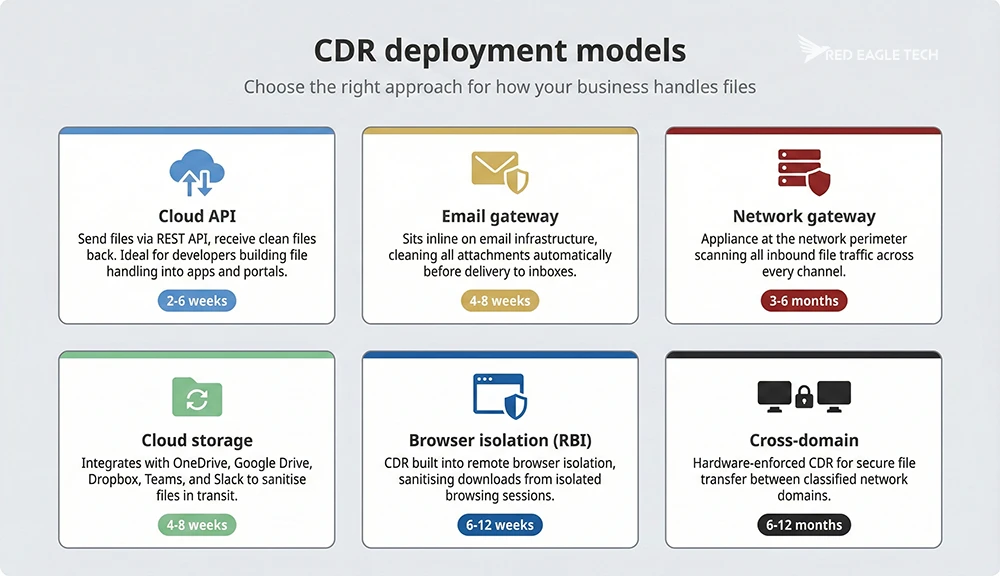
CDR solutions come in several flavours, and the right choice depends on how your business handles files and what level of integration you need.
Deployment models
| Model | How it works | Best for | Implementation timeline |
|---|---|---|---|
| Cloud API | Send files to a cloud CDR service via REST API, get clean files back | Developers building file handling into web apps, portals or workflows | 2-6 weeks |
| Email gateway | CDR sits inline on your email infrastructure, cleaning attachments automatically | Businesses where email is the primary file delivery channel | 4-8 weeks |
| Network gateway | CDR appliance (or ICAP server) at the network perimeter, scanning all file traffic | Larger organisations with significant inbound file volume from multiple channels | 3-6 months |
| Cloud storage | Integrates with OneDrive, Google Drive, Dropbox, Teams and Slack to sanitise files in transit | Businesses with heavy collaboration platform usage | 4-8 weeks |
| Browser isolation (RBI) | CDR built into remote browser isolation, sanitising downloads from isolated sessions | High-security environments, remote workers on untrusted networks | 6-12 weeks |
| Cross-domain | Hardware-enforced CDR for secure file transfer between classified network domains | Defence, intelligence, government inter-agency operations | 6-12 months |
Which vendors, and how to choose between them
The CDR market is small, consolidating and unusually reluctant to publish prices, and the products in it are built for genuinely different jobs. We keep a separate, sourced comparison of the products a UK buyer actually shortlists - what each is built for, how you are able to buy it, which two publish a price on G-Cloud, and where each one is the wrong choice.
See the CDR tools comparison, which includes an interactive filter that eliminates products against your own constraints. For our own service, the Red Eagle Tech CDR API is cloud-based and API-first, with UK processing, published per-document pricing and self-serve signup.
CDR limitations: what it can't do
We'd be doing you a disservice if we didn't mention what CDR can't handle. No security technology is perfect, and understanding the gaps helps you build defences that actually work.
- Executable files: CDR can't sanitise .exe or .dll files. These are legitimate software delivery mechanisms, but they can't be rebuilt from clean templates the way documents can. You'll still need separate controls (reputation analysis, sandboxing, endpoint detection) for executables.
- Password-protected files: CDR can't process files it can't decrypt. If someone sends you a password-protected ZIP file, the CDR system needs the password before it can sanitise the contents. Some solutions (like OPSWAT) can retain the password protection on the cleaned file, but there's an operational overhead in getting passwords from senders.
- Legitimate macros: CDR can't reliably distinguish between a malicious macro and a legitimate one your finance team built. Level 3 positive selection systems do the best job of preserving macro functionality, but some legitimate active content may still be removed. Organisations often handle this with exception policies for trusted internal sources.
- File format edge cases: Complex files can occasionally experience minor compatibility issues after CDR processing - font rendering changes, slight image quality shifts or interactive PDF form fields behaving differently. These issues are uncommon with modern Level 3 systems, but they're worth testing for with your specific file types.
- Structurally clean files carrying malicious intent: this is the big one in 2026, and it's covered in detail earlier in this guide. A PDF whose only payload is a QR code or a link to a credential-harvesting page has nothing for CDR to strip. Since credential phishing now accounts for the overwhelming majority of malicious email payloads, this is the most important limitation on the list. CDR handles the exploit-delivery problem; multi-factor authentication, link and QR inspection and user training handle this one.
- Formats outside the supported list: every CDR product covers a specific set of file types, and anything outside it is passed, blocked or quarantined rather than sanitised. That list is the single most important thing to check against what you actually receive, and it is where coverage gaps quietly appear - SVG went from a rounding error to the third most common malicious attachment type in about eighteen months, and plenty of products still don't touch it.
- Non-file attack vectors: CDR only handles file-based threats. It won't stop credential theft, social engineering or attacks that exploit vulnerabilities in network protocols. It's one piece of the puzzle, not the whole picture.

Where CDR sits in a stack: CDR is very good at what it does - preventing file-borne exploit delivery from reaching your people. But don't fall into the trap of thinking it covers everything. The strongest security setups use CDR alongside endpoint detection, network monitoring and solid incident response planning. If you're building a complete security stack from scratch, our system integration guide covers how to connect these technologies effectively.
UK costs and implementation
CDR pricing varies significantly depending on the deployment model, file volume and vendor. Here's what UK businesses can realistically expect to pay.
Pricing by deployment model
| Deployment model | Typical UK cost | Pricing model |
|---|---|---|
| Cloud API (pay as you go) | From around 15p per document, no subscription | Per-document, prepaid credit |
| Cloud API (SME subscription) | £55-£160/month | Monthly document allowance |
| Cloud API (mid-market) | £500-£1.3k/month | Tiered subscription based on document volume |
| Enterprise platform | £1k-£5k+/month | Annual licensing with support contract |
| Network gateway appliance | £5k-£20k+/year | Hardware + annual licensing and support |
| Managed CDR service | £2k-£10k/month | Fully managed, includes infrastructure and monitoring |
| G-Cloud (public sector) | From £165.75/unit | Pre-negotiated framework pricing |
For context, OPSWAT MetaDefender offers entry-level plans from around £1k per month, with mid-tier plans at £3k-5k per month for higher file volumes and more features. Everfox's Zero Trust CDR is available on the G-Cloud framework at £165.75 per unit for public sector organisations. Our own CDR API starts at £10 of prepaid credit with no subscription at all, or £55 a month for 500 documents.
The question that actually decides this: what does one document cost you?
Most of this market sells capacity rather than documents. You buy an appliance, a licensed instance or a monthly platform fee, and you pay for that capacity whether you use it or not. The advertised price looks perfectly clear; your real cost per document isn't, because it depends entirely on how much of the capacity you actually consume - and most of the time it sits idle.
A £1k-a-month instance works out at 12.5p a document if you push 8,000 files through it, 50p if you push 2,000, and £2 if you only push 500. None of those numbers appears on the quote, because none of them is knowable until the year is over. Usage-based pricing removes the guesswork: you pay per document, peaks and troughs included, and the rate doesn't move when your volume does. Whichever model you're offered, do the same sum - divide by the documents you realistically expect to process, not the ones the capacity could theoretically handle.

Budget 15-25% of your initial deployment costs annually for ongoing operational expenses - maintenance, software updates, support and monitoring.
The costs an appliance quote doesn't show you
If the option in front of you is a physical or virtual appliance, the licence is the part you can see. The rest arrives later, and it lands on your team rather than the vendor's:
- Somewhere to run it: rack space, power and cooling for a physical box; hypervisor capacity and storage for a virtual one. Either way it's capacity you've bought and now have to host
- Keeping it current: firmware and appliance-OS patching, version upgrades, certificate renewals and the change windows to do all of it in
- Keeping it up: if file sanitisation sits in the path of a business process, one appliance is a single point of failure - so it's usually two, plus the load balancing between them
- Somebody to own it: monitoring, capacity planning, support contract renewals and the engineer hours behind all of it, which rarely appear in the business case
And one more, which is easy to miss: the appliance you bought to inspect files is itself an internet-facing security appliance. As covered earlier in this guide, security appliances, networking kit and VPNs were the most-targeted category of enterprise zero-day in 2025 - and Google's researchers specifically noted they tend to lack the endpoint monitoring that would catch an intrusion. Buying one adds a control; it also adds an asset you now have to defend, patch and watch. That's a fair trade in plenty of environments, but it belongs in the cost column rather than being discovered eighteen months later.
Implementation effort
How long CDR takes to deploy depends entirely on the approach you choose:
| Phase | API integration | Full gateway deployment |
|---|---|---|
| Research and preparation | 2-3 weeks | 4-8 weeks |
| Technical design and development | 3-6 weeks | 6-12 weeks |
| Testing and refinement | 2-4 weeks | 4-8 weeks |
| Deployment and monitoring | 1-2 weeks | 2-4 weeks |
| Total | 2-6 weeks (typical) | 3-6 months |
API-based deployments are by far the fastest path to production. OPSWAT claims basic MetaDefender setups can be operational within two hours, though that assumes pre-existing API expertise and minimal testing. A more realistic timeline for a proper API integration with testing and error handling is two to six weeks.
That timeline is mostly documentation debt, not engineering difficulty. Sanitising a file is one HTTP call; what eats the fortnight is working out the auth flow, the polling contract, the error semantics and what happens when the sanitiser says no. Fix the documentation and most of that disappears.
Our target: ten minutes to your first sanitised document.
We've built the CDR API around that number rather than around a sales cycle: OAuth2 client credentials, a synchronous endpoint, a documented error envelope and quickstarts in curl, C#, JavaScript and Python. The documentation also ships instructions written for AI coding assistants, so you can point Claude, Copilot or Cursor at it and let your AI assistant help to get you started. We test our documentation the same way - by handing it to a coding assistant that has never seen the API and timing how long it takes to get a clean file back.
For gateway deployments, you're looking at infrastructure procurement, network architecture changes, integration with existing security systems and extensive testing under realistic load. Plan for three to six months. Cross-domain solutions for defence and government environments, with their hardware-enforced security and assurance requirements, typically need six to twelve months.
Pilot first:
If you're not sure CDR is worth the investment, start with a pilot. Time-box it to 8-12 weeks, focus on your highest-risk file handling workflow (usually email or a customer file upload portal) and set clear success criteria before you begin. A successful pilot gives you quantifiable results to inform a broader rollout.
Where CDR deployments go wrong
The failure modes in this technology are well documented and they're rarely about the sanitisation engine itself. They're about the things nobody specified:
- Underestimating volume and recursion depth: the throughput figure that looked fine in testing meets a Monday-morning inbox, or a ZIP containing a ZIP containing a 400 MB archive. Size both before you commit
- Running default policies untuned: out-of-the-box settings are a starting point, not a configuration. Left alone, they either strip things your finance team needed or keep things you meant to remove
- Not checking supported formats against what you actually receive: spend an hour counting the file types that hit your systems in a normal week. Almost everyone finds something on the list they assumed was covered and isn't
- Never deciding fail-open or fail-closed: when the sanitiser is unavailable, does the file go through unsanitised or does the workflow stop? This gets decided by default at three in the morning during an incident unless you decide it deliberately now
- Neglecting reporting and access control: if nobody can see what was stripped from which file, you have no way to investigate a complaint that a document arrived broken - and no evidence trail when an auditor asks
- Skipping the pilot on the workflow that matters: piloting on low-risk internal files proves very little. Test it where the real files arrive

The ROI case for CDR
CDR is an investment, so let's talk numbers. The average UK data breach costs £3.29 million. In financial services, it's £5.74 million. The M&S attack in 2025 resulted in estimated losses of £300 million.
For a business spending somewhere between £660 and £2k a year on a cloud CDR API, the arithmetic isn't hard to justify - but use the right number to justify it. As covered earlier, the widely-quoted £3.29 million average describes mid-sized and larger organisations in IBM's benchmark sample, not a typical UK SME. The figure that fits most businesses is the government's: a median cost of roughly nothing, a 95th-percentile cost of £4k to £10k and an average of about £195k once an incident is significant enough to cost more than £500 at all.
That's the shape of the risk: cheap most of the time, and occasionally the worst quarter you've ever had. You don't need to believe CDR prevents every breach, or even most of them - only that it removes some share of the tail, which is the part that actually threatens the business.
We'd treat any precise ROI percentage in this market with suspicion, including one of ours. Nobody can tell you what proportion of your breach risk a single control removes, and a vendor quoting a figure to two decimal places is modelling, not measuring. What can be said plainly is that the cost of this particular control has fallen far enough that the decision rarely turns on the exact number.
Beyond direct breach cost reduction, CDR delivers indirect savings: reduced incident response costs (organisations with dedicated security controls save an average of £183k annually on incident response), avoided regulatory fines under the new Cyber Security and Resilience Bill and productivity gains from preventing ransomware that would otherwise shut down operations for weeks.
Red Eagle Tech CDR API
We built our CDR API because the rest of this market is built for organisations with procurement departments. Nearly every option covered above is sold by quotation, starts in the thousands per month or assumes you have a security team to run it. If you're a development team that needs to sanitise the documents your customers upload, none of that fits.
So ours works the other way round. Sign up, collect your credentials and sanitise your first document in a single sitting - you can be sanitising your first document inside ten minutes. The documentation ships with instructions written for AI coding assistants as well as for people, so if you're building with Claude, Copilot or Cursor you can hand them the integration guide and let them wire it up. If you'd rather talk to an engineer first, you're very welcome to; you simply don't have to wait for one.
Pricing is published per document, starting at £10 of prepaid credit with no subscription at all, £55 a month for 500 documents, and it scales down to as little as 4p a document at volume. Files are processed in the UK. Authentication is standard OAuth2 client credentials, and there's a synchronous endpoint if you'd rather clean a file inline than poll for it.
Or have it as part of a managed service
An API suits you if files arrive through an application you run. Plenty of organisations have the opposite problem: the risky files arrive by email, or through OneDrive, SharePoint and Teams, and what they want is for somebody else to deal with it entirely.
That's covered too. Our managed IT support includes advanced email and Microsoft 365 security on every tier, with CDR built in - attachments and shared files are stripped and rebuilt before anyone opens them. It sits alongside sandboxing, antivirus, anti-phishing, malicious-website blocking and endpoint detection and response, so the sanitisation is one layer of a stack rather than a product you have to integrate and maintain. If your file risk is an email and collaboration problem rather than an application one, that's the more natural route in.
What you get
- Cloud CDR with UK processing, no infrastructure to run
- Office documents, PDF, RTF, OpenDocument, HTML, XML, SVG and common image formats
- REST API with OAuth2, synchronous or asynchronous
- Documentation written for people and for AI coding assistants
- Live in about ten minutes, self-serve from start to finish
- Published per-document pricing - from £10 prepaid, down to 4p per document at volume
Where we're not the right answer: if you need ICAP or gateway deployment, air-gapped or cross-domain transfer, on-premises installation or defence-grade accreditation, buy from one of the specialists covered above instead. They build for that and we don't. We're the right fit when you want document sanitisation available as an API, priced per document, without a procurement cycle.
Frequently asked questions
Sources
- Department for Science, Innovation and Technology and Home Office, Cyber Security Breaches Survey 2025/2026 - UK breach rates by business size, ransomware incidence, phishing share, control gaps and the perceived-cost distribution (median, quartiles and 95th percentile) - gov.uk, published 30th April 2026
- Department for Science, Innovation and Technology, independent economic-impact research conducted by KPMG - average cost of a significant UK cyber incident (one costing at least £500) and the annual cost to the UK economy - gov.uk, published November 2025
- IBM and Ponemon Institute, Cost of a Data Breach Report 2025 - UK and global average breach costs, AI-related breach findings and the study methodology (600 organisations, breaches of roughly 3,000 to 114,000 records, very small and very large breaches excluded) - ibm.com/reports/data-breach, 2025
- Google Threat Intelligence Group, Look What You Made Us Patch: 2025 Zero-Days in Review - zero-day counts, enterprise targeting share, ransomware-affiliate exploitation - cloud.google.com, 2026
- Microsoft Security, Email threat landscape: Q1 2026 trends and insights - malicious payload mix by file type - microsoft.com/security/blog, 30th April 2026
- Microsoft Security, Email threat landscape: Q2 2026 trends and insights - payload mix, credential-phishing share, SVG campaign scale - microsoft.com/security/blog, 23rd July 2026
- Hoxhunt, Phishing Trends Report - growth of malicious SVG attachments and attachment-type rankings - hoxhunt.com, updated 2026
- Barracuda Networks, 2026 Email Threats Report - malicious rates by attachment type - barracuda.com, 2026
- Verizon, 2026 Data Breach Investigations Report - initial access vectors and third-party involvement - verizon.com/business/resources/reports/dbir, 2026
- SANS Internet Storm Center, analysis of SVG attachment MIME-type evasion - isc.sans.edu, 2nd June 2026
- National Cyber Security Centre, Annual Review - nationally significant incidents handled - ncsc.gov.uk, 2025
- VulnCheck, analysis of Known Exploited Vulnerabilities - speed of exploitation after disclosure - vulncheck.com, 2025
- AV-TEST Institute, malware statistics - daily new malware sample volumes - av-test.org, accessed July 2026
- OPSWAT, Content Disarm and Reconstruction (CDR): 8 Best Vendors in 2026 - vendor landscape and 2026 CDR trends - opswat.com, 2026
Want to improve your file security?
At Red Eagle Tech, we help UK businesses protect against file-based threats with our CDR API as part of our wider IT operations and cybersecurity services. Whether you're handling file uploads, processing email attachments or exchanging documents with external partners, we can help you clean up your file security without the complexity. We've also written about cybersecurity essentials for UK SMEs and common cyber security threats if you want to explore the broader picture.
Fancy a chat about your file security? Give us a shout and let's talk.





